nerdexam
Microsoft

PL-200 · Question #229

Drag and Drop Question The components must be transported to a different environment. - Add data to the new table. - Delete an unused area from the site map. You need to determine the method…

The correct answer is Solution; Configuration Migration tool; Solution. This question tests the understanding of different methods used to transport metadata/customizations versus data in Microsoft Power Platform/Dynamics 365 environments.

Manage environments

Question

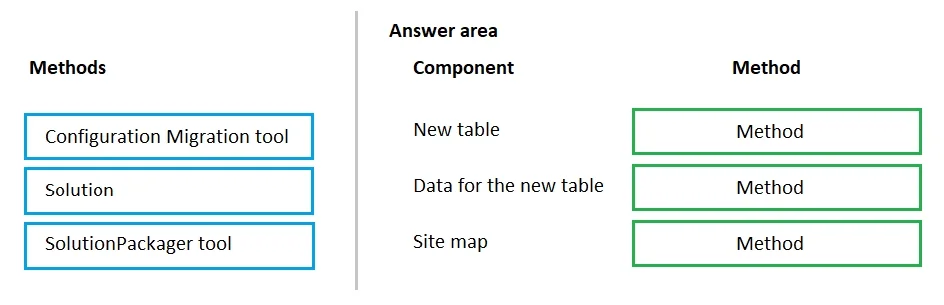
Drag and Drop Question The components must be transported to a different environment. - Add data to the new table. - Delete an unused area from the site map. You need to determine the method required to transport each component. Which method should you use? To answer, drag the appropriate methods to the correct components. Each method may be used once, more than once, or not at all. You may need to drag the split bar between panes or scroll to view content. NOTE: Each correct selection is worth one point. Answer:

Exhibit
PL-200 question #229 exhibit

Answer Area

Drag items

Configuration Migration toolSolutionSolutionPackager tool

Correct arrangement

  • Solution
  • Configuration Migration tool
  • Solution

Explanation

This question tests the understanding of different methods used to transport metadata/customizations versus data in Microsoft Power Platform/Dynamics 365 environments.

Approach. The correct approach involves understanding which tool or method is appropriate for transporting different types of assets in a Power Platform/Dynamics 365 environment:

  • New table: A new table is a metadata component, defining the structure of data. Metadata and customizations (like tables, forms, views, business rules) are transported between environments using Solutions. Therefore, 'New table' is dragged to 'Solution'.
  • Data for the new table: This refers to the actual records stored within a table, which is configuration data. The Configuration Migration tool is specifically designed to export and import record data (configuration data) between environments. Therefore, 'Data for the new table' is dragged to 'Configuration Migration tool'.
  • Site map: A site map defines the navigation structure of a model-driven app, which is a customization component. Like tables, site maps are metadata components and are bundled within Solutions for deployment and transport. Therefore, 'Site map' is dragged to 'Solution'.

Common mistakes.

  • common_mistake. A common mistake would be to confuse the purpose of the 'SolutionPackager tool' or to incorrectly apply the 'Configuration Migration tool' to metadata. The 'SolutionPackager tool' is used for deconstructing and reconstructing solution files for source control and advanced development scenarios, not for directly 'transporting' components or data between environments as a primary method for end-users or administrators. Using 'Solution' for 'Data for the new table' would be incorrect because solutions transport the schema/structure, not the actual record data. Similarly, using the 'Configuration Migration tool' for 'New table' or 'Site map' would be wrong because this tool handles records, not metadata definitions.

Concept tested. Deployment and migration strategies for Microsoft Power Platform/Dynamics 365, specifically understanding the difference between transporting metadata/customizations (via Solutions) and record data (via Configuration Migration tool).

Topics

#Environment Management#Application Lifecycle Management (ALM)#Data Migration#Configuration Migration

Community Discussion

No community discussion yet for this question.

Full PL-200 Practice