PL-200 · Question #228
PL-200 Question #228: Real Exam Question with Answer & Explanation
This question tests knowledge of Power Apps variable types and their appropriate use cases for managing temporary data in multi-screen canvas apps.
Question
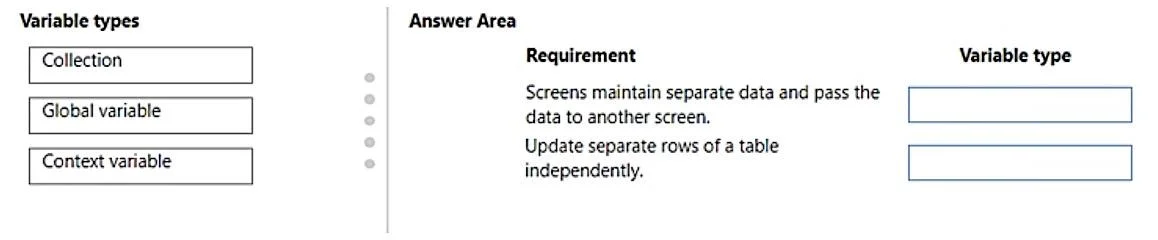
Drag and Drop Question You plan to create a canvas app with multiple screens. The app needs to store temporary data while the app is running. The app has the following data requirements: - Each screen must maintain a separate copy of data and pass the data to another screen. - The app must be able to update separate rows of a table independently. You need to configure variables for the data. Which variable types should you use? To answer, drag the appropriate variable types to the correct requirements. Each variable type may be used once, more than once, or not at all. You may need to drag the split bar between panes or scroll to view content. NOTE: Each correct selection is worth one point. Answer:
Explanation
This question tests knowledge of Power Apps variable types and their appropriate use cases for managing temporary data in multi-screen canvas apps.
Approach. To answer correctly, you must drag 'Global variable' to the first requirement and 'Collection' to the second requirement.
- Requirement 1: 'Screens maintain separate data and pass the data to another screen.' A 'Global variable' is the correct choice here. Global variables (created with the
Set()function) are accessible from all screens in the app. This allows data to be shared and 'passed' between multiple screens consistently. While context variables can pass data during navigation, they are screen-specific, whereas a global variable provides app-wide scope for data that needs to be accessible across different screens. - Requirement 2: 'Update separate rows of a table independently.' A 'Collection' is the correct choice. Collections are tabular variables in Power Apps, capable of storing multiple records (rows) and columns. They are specifically designed for scenarios where you need to manage a dataset in memory, allowing for independent operations like adding, updating, or removing individual records using functions like
Collect(),UpdateIf(), orPatch().
Common mistakes.
- common_mistake. Using 'Context variable' for the first requirement (screens maintaining and passing data) is a common mistake. Context variables are specific to a single screen and primarily used for data that stays within that screen's scope, or for passing parameters to a new screen during navigation. They do not provide app-wide access in the same way a global variable does, making them less suitable for general data sharing and 'passing' across screens. Using either 'Global variable' or 'Context variable' for the second requirement (updating separate rows of a table) would be incorrect because neither of these variable types is designed to store or manipulate tabular data with individual record updates; 'Collections' are specifically for this purpose.
Concept tested. The core concept being tested is the understanding of different variable types in Power Apps (Global variables, Context variables, and Collections) and their appropriate scope and functionality for managing temporary data within a canvas app with multiple screens.
Topics
Community Discussion
No community discussion yet for this question.