
Microsoft
PL-100 · Question #87
Drag and Drop Question A company has the following divisions: wholesale and retail. The manufacturer wants to create a single Power BI report to allow users to view data from a Microsoft SQL Server…
This question assesses knowledge of Power BI Row-Level Security (RLS), specifically distinguishing between where RLS roles are defined and where users are assigned to those roles.
Create business solutions
Question
Drag and Drop Question A company has the following divisions: wholesale and retail. The manufacturer wants to create a single Power BI report to allow users to view data from a Microsoft SQL Server database. You need to ensure that each user sees data only for the team to which the user is assigned. How should you secure the report? To answer, drag the appropriate options to the correct action. Each option may be used once, more than once, or not at all. You may need to drag the split bar between panes or scroll to view content. NOTE: Each correct selection is worth one point. Answer:
Exhibit
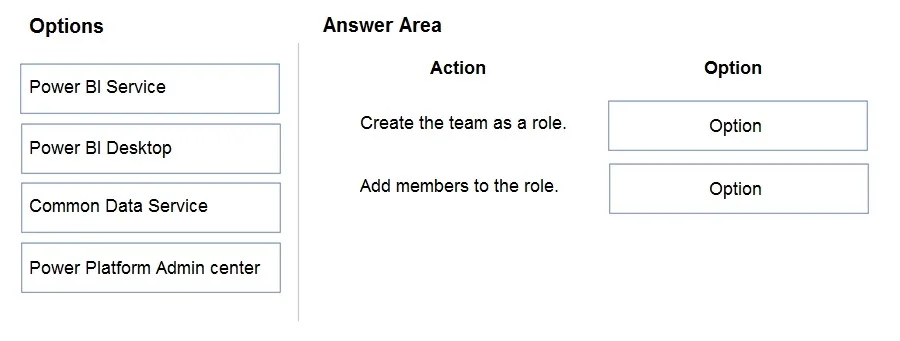
Options
- Option 1Power BI Service
- Option 2Power BI Desktop
- Option 3Common Data Service
- Option 4Power Platform Admin center
Why each option
This question assesses knowledge of Power BI Row-Level Security (RLS), specifically distinguishing between where RLS roles are defined and where users are assigned to those roles.
Option 1Power BI Service
Option 2Power BI Desktop
Option 3Common Data Service
Option 4Power Platform Admin center
Concept tested: The core concept being tested is the implementation workflow of Row-Level Security (RLS) in Power BI, including understanding the distinct roles of Power BI Desktop (for defining roles and rules) and Power BI Service (for assigning users to those defined roles).
Topics
#Power BI#Row-Level Security (RLS)#Data Security#Report Security
Community Discussion
No community discussion yet for this question.