
PL-100 · Question #85
Drag and Drop Question The company is adding a multi-stream interactive dashboard to a model-driven app. The company requires configuration of the dashboard to filter the table data based on…
The correct answer is Filter table; Filter by. This question tests the understanding of configuring interactive dashboard filters in Power Apps model-driven apps, distinguishing between the overall filter attribute and the specific field used for filtering.
Question
Exhibit
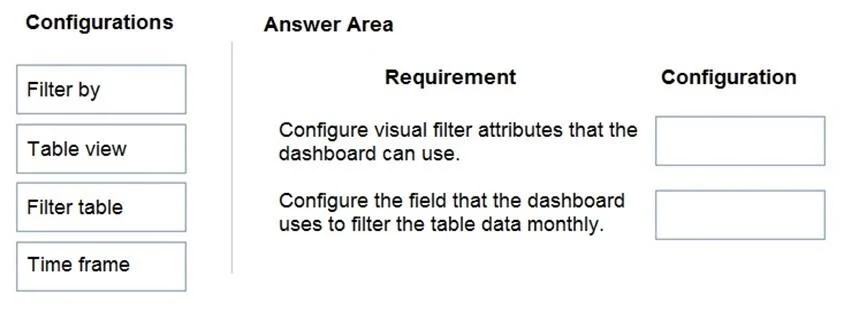
Answer Area
Drag items
Correct arrangement
- Filter table
- Filter by
Explanation
This question tests the understanding of configuring interactive dashboard filters in Power Apps model-driven apps, distinguishing between the overall filter attribute and the specific field used for filtering.
Approach. 1. For the requirement 'Configure visual filter attributes that the dashboard can use.', the correct configuration is 'Filter table'. In Power Apps model-driven apps, when creating an interactive dashboard, the ability to apply visual filters across various components (like charts and lists) is tied to filtering the underlying data 'table'. 'Filter table' refers to the attribute or setting that enables the dashboard to apply filters directly to its data source (a table). 2. For the requirement 'Configure the field that the dashboard uses to filter the table data monthly.', the correct configuration is 'Filter by'. When setting up a filter, you must specify which specific field (column) the filter should operate on. For example, to filter for 'modified accounts over the last month', you would typically filter by a date field such as 'Modified On'. 'Filter by' is the configuration option used to select this specific field, allowing the dashboard to apply filtering criteria to it.
Common mistakes.
- common_mistake. Using 'Table view' for either requirement is incorrect because a table view is a predefined query or subset of data; it defines what data is initially displayed, not how a filter's attributes are configured or which field is used for filtering. Using 'Time frame' for the second requirement ('Configure the field that the dashboard uses to filter the table data monthly.') is a common mistake. While the scenario mentions 'over the last month' (a time frame), 'Time frame' itself is a condition or value for a filter (e.g., 'Last Month', 'Last Year'), not the field itself that is being filtered. The question specifically asks for the 'field' that the dashboard uses to filter. The field would be something like 'Modified On', and 'Filter by' is the option used to select that field. The 'Time frame' would then be applied as a filter criteria to the field chosen by 'Filter by'.
Concept tested. Configuration of interactive dashboards and their filtering capabilities in Microsoft Power Apps model-driven apps, specifically distinguishing between the general filter attribute for a dashboard's data source and the selection of the specific field used for filtering.
Topics
Community Discussion
No community discussion yet for this question.