
PL-100 · Question #296
Drag and Drop Question A company uses Power Apps. The company has a SharePoint list that contains the names of partner organizations and the country/region of the partners. The company requires a…
The correct answer is Send all users an email invitation.; Enable Can use permission. This question assesses the ability to select the correct Power Apps functions for common data manipulation tasks in a canvas app gallery, including searching for exact words, sorting by date, and displaying unique values.
Question
Exhibit
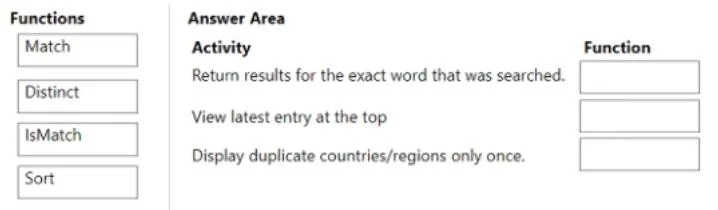
Answer Area
Drag items
Correct arrangement
- Send all users an email invitation.
- Enable Can use permission.
Explanation
This question assesses the ability to select the correct Power Apps functions for common data manipulation tasks in a canvas app gallery, including searching for exact words, sorting by date, and displaying unique values.
Approach. The correct approach is to match each activity to the Power Apps function that best achieves the described requirement:
- Return results for the exact word that was searched: The
Matchfunction is used to find a specific pattern (which can be an exact word) within a text string and return a record containing the matched text and its position. WhileIsMatchchecks for a pattern and returns a boolean,Matchprovides the 'results' of the match, aligning better with the phrasing 'Return results'. For instance,Filter(DataSource, Not(IsBlank(Match(ColumnName, SearchTerm))))or similar constructs could useMatchto identify records based on an exact word pattern. - View latest entry at the top: The
Sortfunction is used to order a table of data based on one or more columns. To view the latest entry at the top, the data would be sorted by a date/time column (e.g., 'Created' or 'Modified') in descending order. - Display duplicate countries/regions only once: The
Distinctfunction is designed to extract unique, non-duplicate values from a specified column in a table. This is ideal for populating a dropdown list or showing unique categories.
Common mistakes.
- common_mistake. A common mistake would be to use
IsMatchinstead ofMatchfor 'Return results for the exact word that was searched.' WhileIsMatchdetermines if a string matches a pattern (returning true/false),Matchactually returns a record with the matched string details, which better fits 'Return results'. Another mistake could be attempting to useMatchorIsMatchfor sorting or getting distinct values, as their functionalities are entirely different. Not usingSortfor ordering orDistinctfor uniqueness would indicate a lack of understanding of fundamental data manipulation functions in Power Apps.
Concept tested. The core concept tested is the understanding and correct application of fundamental Power Apps data functions- specifically Match, Sort, and Distinct- for common gallery and control data manipulation scenarios like searching, ordering, and filtering for unique values.
Topics
Community Discussion
No community discussion yet for this question.