
PL-100 · Question #295
Drag and Drop Question A company uses Microsoft Power Platform. All users in the company have read/write and create access to SharePoint. You create a canvas app that displays data from a SharePoint…
The correct answer is Send all users an email invitation.; Enable Can use permission. To allow users to access a canvas app and its SharePoint data without modifying the data source, grant 'Can use' permission to the SharePoint connection and send an email invitation for the app.
Question
Exhibit
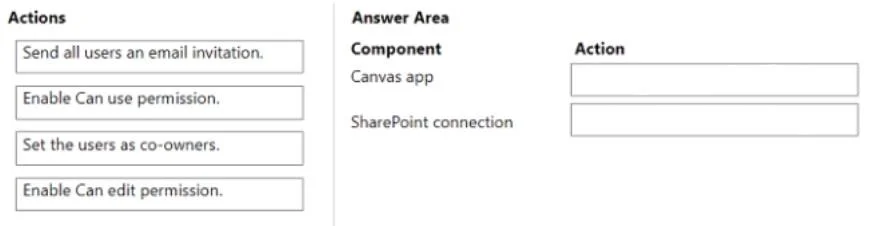
Answer Area
Drag items
Correct arrangement
- Send all users an email invitation.
- Enable Can use permission.
Explanation
To allow users to access a canvas app and its SharePoint data without modifying the data source, grant 'Can use' permission to the SharePoint connection and send an email invitation for the app.
Approach. The scenario requires sharing a canvas app that displays data from a SharePoint list. A group of users must be able to use the app but are explicitly restricted from changing the data source configuration. Users already have read/write and create access to the SharePoint list directly.
-
For the 'SharePoint connection': The core requirement is that users should not be able to 'change the data source'. In Power Apps, connections can be shared, and granting 'Can use' permission to a connection allows users to utilize that connection through an app, but prevents them from modifying the connection's settings or its configuration within the Power Apps environment. This directly addresses the constraint. Therefore, 'Enable Can use permission.' is the correct action to drag to 'SharePoint connection'.
-
For the 'Canvas app': After ensuring the connection is secured with 'Can use' permission, the remaining step for sharing the app itself, from the available options, is 'Send all users an email invitation.'. While users also need 'Can use' permission on the app to run it, sending an email is a standard and important action during the sharing process to notify users of the app's availability and provide them with a direct link to access it. Given that 'Enable Can use permission' is already allocated to the connection for the specific data source constraint, sending an email is the appropriate explicit action for the Canvas app component in this context.
Common mistakes.
- common_mistake. 1. Setting users as co-owners or enabling 'Can edit' permission for the Canvas app: These options would grant users elevated privileges, allowing them to modify the app's design, including its data source connections. This directly contradicts the requirement that users should not have the 'ability to change the data source'.
- Applying 'Send all users an email invitation' to 'SharePoint connection': Sending an email invitation is a notification mechanism for users about an application, not a permission or action directly applied to a data connection.
- Applying 'Enable Can use permission' to 'Canvas app' while leaving 'SharePoint connection' without an appropriate action: While users do need 'Can use' permission on the app, the question explicitly highlights the constraint regarding 'changing the data source'. Granting 'Can use' permission to the 'SharePoint connection' directly addresses this specific security requirement for the connection itself. If 'Enable Can use permission' were used for the Canvas app, there would be no suitable action remaining for the SharePoint connection to enforce the 'no change to data source' rule.
Concept tested. Microsoft Power Platform Canvas app sharing and security model, understanding different permission levels ('Can use', 'Can edit', 'Co-owner') for apps and their underlying data source connections, and the administrative actions involved in sharing an app with users while enforcing specific access controls.
Topics
Community Discussion
No community discussion yet for this question.