
PL-100 · Question #231
Case Study 3 - A culinary arts college Background A culinary arts college trains world class chefs by offering a blend of theoretical and practical education. The culinary arts program enrolls two…
The correct answer is A grid filter that filters by both threshold and quantity. This question tests the ability to identify essential Power Platform actions for data integration, visualization, and filtering based on a given business scenario.
Question
" lunch orders placed between 10:00 AM and noon from an open menu, subject to availability. Most occasional and high-volume subscribers became fans of the college after ordering from the public subscription. - Occasional subscribers " a fixed number of meals, either monthly or weekly. - High volume `" businesses that provide their staff free lunches every workday. A group of 25 business subscribers each order an average of 2,000 meals per day. The number of occasional subscribers varies daily. The college generates a QR code for high-volume subscribers to allow staff to vote for their favorite dishes. Requirements Class management The solution must track credits earned by the students. Students require a fixed number of credits in the chef's role to gain the cuisine specialization. Students can acquire credits by using any of the following methods: - fans of the college - number of hours in practical sessions as helpers - number of hours as chefs - popular votes from dishes prepared as chefs - marks from the class instructor Students must confirm their attendance by selecting Start at the beginning of each class and selecting Done at the end of the class. The student's total number of practice hours and credits earned must display in the app. Students team up together to create new recipes and must keep their recipes confidential. The instructors photograph dishes that pass quality checks and upload the photographs to the daily menu that is made available to subscribers. Dish votes are counted based on the number of people who marked the dish as a favorite. The college requires a lively visual that displays marketing data on their public-facing website. Requirements Subscriptions The subscriber administrators must approve the credit terms for high-volume subscribers. Occasional and high-volume subscribers must be able to place orders online. Subscribers should be able to mark a dish as favorite directly from their order. Requirements Food management Instructors must be able to reserve the quantities of ingredients that they require for cooking sessions. Each ingredient has a primary unit of measure for bulk ordering and a second unit of measure for using in a recipe. (For example, flour in pounds when ordering and in cups for use in a recipe). The app must display the current inventory and reserved quantities for each ingredient needed for a recipe. The display must be consistent for appropriate roles. Food banks must be able to access the food pool online and place their orders from a filtered list based on their location. The college must replace the food bank notifications with an automated system that food bank users can access directly from the college's public website. The app must use a chatbot to replace the food bank notifications so that food bank users can see food available for pickup by food banks. Issues One instructor discovers discrepancies in the ingredient inventory and requests the standardization of the units of measures for all ingredients. Each time an ingredient is used in a recipe, the secondary unit of measure must be populated and be read only. Students report that they are not able to see their total practice hours in the app. Question Drag and Drop Question You need to resolve the issue related to the student canvas app. Which three actions should you perform in sequence? To answer, move the appropriate actions from the list of actions to the answer area and arrange them in the correct order. Answer:Exhibit
Answer Area
Drag items
Correct arrangement
- A grid filter that filters by both threshold and quantity
Explanation
This question tests the ability to identify essential Power Platform actions for data integration, visualization, and filtering based on a given business scenario.
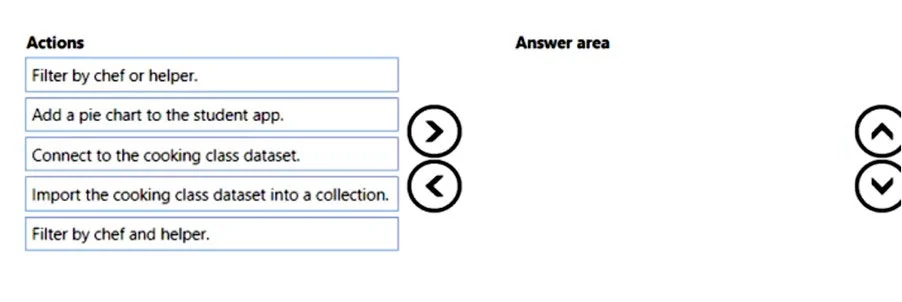
Approach. Based on the provided solution in the second image, the correct interactions are to drag 'Connect to the cooking class dataset.', 'Add a pie chart to the student app.', and 'Filter by chef or helper.' into the 'Answer area'.
- Connect to the cooking class dataset.: This is a fundamental step for any Power Platform solution that needs to interact with data. The case study clearly states the college uses 'several systems to manage the student classroom activities' and plans a 'Microsoft Power Platform solution'. To leverage existing or new data (like a 'cooking class dataset', 'subscribers and their dish preferences'), the Power Platform solution must establish a connection to its source. This provides real-time access and allows for scalable data operations.
- Add a pie chart to the student app.: The case study mentions students are involved in activities like packaging meals and instructors publish menus. It also states the goal is to 'align the cooking curriculum to the taste preferences of their subscribers'. A pie chart is a common data visualization tool that can be used in a student-facing app to display various insights, such as the distribution of dishes, progress toward goals, or subscriber preferences, enhancing the student's understanding and engagement. This directly supports the creation of an application for students or instructors.
- Filter by chef or helper.: The scenario states, 'Each instructor is in charge of one group of students.' In a culinary context, 'chef' or 'helper' likely refers to roles related to instructors, students, or staff managing cooking activities. The ability to filter data by these roles is crucial for managing groups, assigning tasks, tracking performance, or viewing relevant information specific to a role. This is a common requirement for managing complex educational or operational data within an application.
Common mistakes.
- common_mistake. The common mistake would be to include 'Import the cooking class dataset into a collection.' in the 'Answer area'. While collections are a feature in Power Apps, they are primarily for in-memory, temporary data storage within a single app session, or for local manipulation of a subset of data. For building a robust and scalable Power Platform solution that manages an organization's core data (like a 'cooking class dataset'), 'connecting' to the dataset is the standard and preferred approach. A direct connection allows for real-time data updates, persistence, and interaction with the backend data source, which is essential for a comprehensive solution. Importing into a collection would not be the primary method for initial data integration or for maintaining an authoritative data source across a Power Platform solution.
Concept tested. Data integration in Power Apps, Power Apps UI/UX components (data visualization), data filtering techniques, and requirements analysis for Power Platform solution design.
Topics
Community Discussion
No community discussion yet for this question.