
PL-100 · Question #136
Drag and Drop Question A company uses data from a publicly available web service. You plan to create a tabular report by using Power BI Desktop to visualize data from the web service. The data…
The correct answer is Create a connection to the web service.; Perform data transformation.; Create the visualization.; Publish to the Power BI service. To create and share a Power BI report from a web service, the sequence involves connecting to the data, transforming it as needed, building the visualization, and then publishing it to the Power BI service for co-worker access.
Question
Exhibit
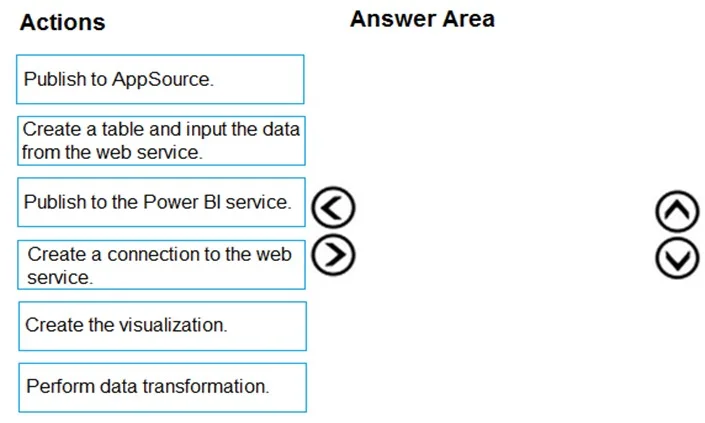
Answer Area
Drag items
Correct arrangement
- Create a connection to the web service.
- Perform data transformation.
- Create the visualization.
- Publish to the Power BI service.
Explanation
To create and share a Power BI report from a web service, the sequence involves connecting to the data, transforming it as needed, building the visualization, and then publishing it to the Power BI service for co-worker access.
Approach. The correct interaction is to drag the following four actions into the 'Answer Area' in the specified order:
- Create a connection to the web service: This is the foundational first step. Before any data can be used or transformed, Power BI Desktop must establish a connection to its source, which in this scenario is a publicly available web service. This action retrieves the initial dataset.
- Perform data transformation: The scenario explicitly states that a numeric column must be converted to a text value. After connecting and loading the data, the next logical step is to perform this required data cleaning and transformation using Power Query Editor to prepare the data for accurate visualization.
- Create the visualization: Once the data is connected, cleaned, and transformed according to requirements, the next step is to build the report. This involves creating the tabular report and visualizations (charts, tables, etc.) in Power BI Desktop to present the data effectively, as requested by the scenario to 'visualize data'.
- Publish to the Power BI service: The final requirement is to make the report available 'only to co-workers' and ensure the 'most up-to-date version of the data must always be used'. Publishing the report from Power BI Desktop to the Power BI service (app.powerbi.com) allows for controlled sharing with specific users or groups within an organization and enables features like scheduled data refresh to ensure data freshness. This fulfills the sharing and data currency requirements.
Common mistakes.
- common_mistake. Common mistakes include selecting the wrong actions or placing them in an incorrect order.
- 'Publish to AppSource': This is incorrect because AppSource is used for publicly distributing Power BI apps or visuals, which contradicts the requirement to make the report available 'only to co-workers'. Publishing to the Power BI service allows for private, controlled sharing within an organization.
- 'Create a table and input the data from the web service': This action is inaccurately phrased for Power BI's data acquisition method from a web service. Power BI 'connects' to a web service and loads the data, it doesn't typically involve manually 'creating a table and inputting' data in this context. The more accurate term is 'Create a connection'.
- Incorrect Sequencing: Forgetting that data acquisition ('Create a connection') must precede data preparation ('Perform data transformation'), and both must precede report creation ('Create the visualization'). Similarly, the report must be created before it can be shared ('Publish to the Power BI service'). Any deviation from this logical flow for these core activities would lead to an incorrect answer.
Concept tested. The core concepts tested are the end-to-end workflow for creating and sharing a Power BI report from an external data source, including data connection, data transformation (ETL principles), report visualization, and appropriate publishing/sharing methods within the Power BI ecosystem.
Topics
Community Discussion
No community discussion yet for this question.