
PL-100 · Question #126
Drag and Drop Question A company is building multiple Power Apps apps to support a mobile sales team. The apps must all share a common control that has custom properties. You need to create a…
The correct answer is Component library; Component. This question tests the understanding of Power Apps components and component libraries, specifically how to enable reuse of custom controls across multiple apps and how components receive input data through custom properties.
Question
Exhibit
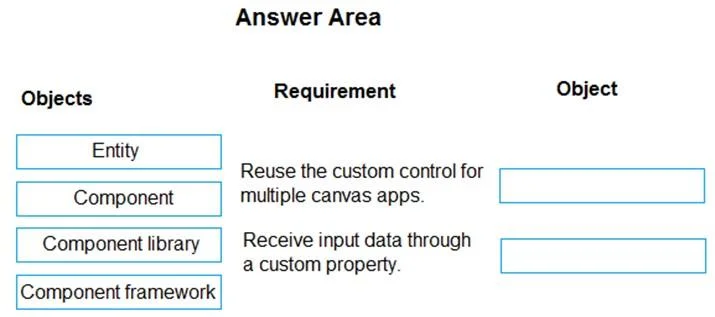
Answer Area
Drag items
Correct arrangement
- Component library
- Component
Explanation
This question tests the understanding of Power Apps components and component libraries, specifically how to enable reuse of custom controls across multiple apps and how components receive input data through custom properties.
Approach. 1. For 'Reuse the custom control for multiple canvas apps.': The correct object to drag is 'Component library'. A component library in Power Apps is specifically designed to store and manage components, making them reusable across multiple canvas apps. This centralizes the custom controls and ensures consistency. 2. For 'Receive input data through a custom property.': The correct object to drag is 'Component'. A Power Apps component is a reusable building block that can have custom input and output properties. These properties allow the component to receive data from the app where it is used (input properties) or pass data back to the app (output properties), enabling dynamic and configurable behavior.
Common mistakes.
- common_mistake. 1. Dragging 'Entity': An 'Entity' (or table in Dataverse) is used for data storage, not for creating or reusing UI controls. It is unrelated to the requirements of sharing a custom control or defining its properties.
- Dragging 'Component framework': While 'Component framework' (likely referring to Power Apps Component Framework - PCF) is used to build custom controls with code, the requirement 'Receive input data through a custom property' is a fundamental capability of a standard Power Apps 'Component' as well. For reusing a custom control across multiple canvas apps, the 'Component library' is the specific feature for sharing the component itself. PCF components are custom controls, but a 'Component' is the general term for a reusable UI element within Power Apps canvas apps that can have custom properties, and 'Component library' is the mechanism for sharing them.
- Confusing 'Component' and 'Component library': A common mistake would be to drag 'Component' to the first requirement. While a component is the custom control, a component library is the mechanism that allows for its reuse across multiple apps. Conversely, dragging 'Component library' to the second requirement would be incorrect, as the 'Component' itself is what inherently possesses custom properties to receive input data, not the library that merely houses it.
Concept tested. Power Apps Canvas app Components and Component Libraries. This includes understanding the purpose of components for creating reusable UI elements, the use of custom properties for input/output, and the role of component libraries in sharing components across multiple applications.
Topics
Community Discussion
No community discussion yet for this question.