
PL-100 · Question #105
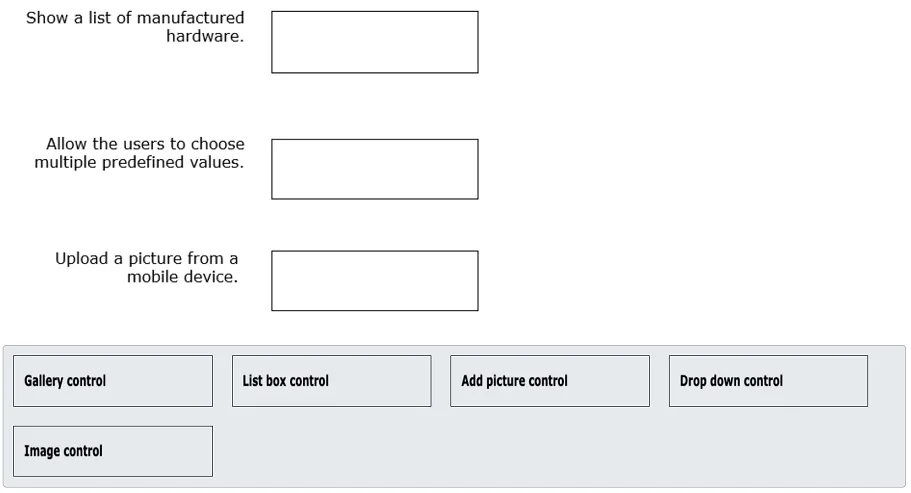
Drag and Drop Question You are building a new screen in a canvas app for a hardware manufacturer. You need to use the appropriate control types to design this screen. What control type should you…
The correct answer is Gallery control; List box control; Add picture control. This question assesses the ability to select appropriate Power Apps canvas app controls for specific user interface requirements, focusing on displaying lists, allowing multiple selections, and uploading images.
Question
Exhibit
Answer Area
Drag items
Correct arrangement
- Gallery control
- List box control
- Add picture control
Explanation
This question assesses the ability to select appropriate Power Apps canvas app controls for specific user interface requirements, focusing on displaying lists, allowing multiple selections, and uploading images.
Approach. 1. Show a list of manufactured hardware.: The correct control is the 'Gallery control'. A gallery is specifically designed to display a collection of items (like a list of hardware products) from a data source in a flexible, templated format, allowing for various layouts (vertical, horizontal, flexible height, etc.) and the display of multiple fields per item (e.g., name, model, image, price). 2. Allow the users to choose multiple predefined values.: The correct control is the 'List box control'. A list box displays a scrollable list of items and explicitly allows users to select one or more items from that list. This directly addresses the requirement for 'multiple predefined values'. 3. Upload a picture from a mobile device.: The correct control is the 'Add picture control'. This control is a specialized input control in Power Apps that enables users to select an image from their device's camera or photo library and then displays a preview of the selected image, making it ideal for uploading pictures from mobile devices.
Common mistakes.
- common_mistake. Using the 'Drop down control' for 'Allow the users to choose multiple predefined values' would be incorrect because, by default, a Drop down control only allows a single selection. While it displays a list of predefined values, it lacks the multi-selection capability required. Using the 'Image control' for 'Upload a picture from a mobile device' is incorrect because the Image control is used to display an image (either static or dynamically loaded from a URL or data source), not to allow a user to upload or select a new image from their device. Confusing 'Image control' (for display) with 'Add picture control' (for input/upload) is a common mistake. The 'List box control' would be wrong for displaying a list of hardware if detailed templating is required, as it primarily serves for selection from a simple list, not rich data display like a gallery.
Concept tested. This question tests the knowledge of Power Apps canvas app controls and their appropriate use cases, focusing on data display (lists and galleries), user input for selection (single vs. multiple), and media handling (uploading pictures). It specifically assesses understanding of the unique functionalities of Gallery, List box, Add picture, Drop down, and Image controls.
Topics
Community Discussion
No community discussion yet for this question.