
PL-100 · Question #107
Drag and Drop Question You create a Power Apps environment without a Dataverse database to support development for a new client. The client wants the environment to be configured in French. You need…
The correct answer is Select the environment that the database needs to be created in.; Configure currency and language settings.; Select Create my database. To create a Dataverse database in an existing Power Apps environment and configure its language, you must first select the environment, then define the currency and language settings, and finally initiate the database creation.
Question
Exhibit
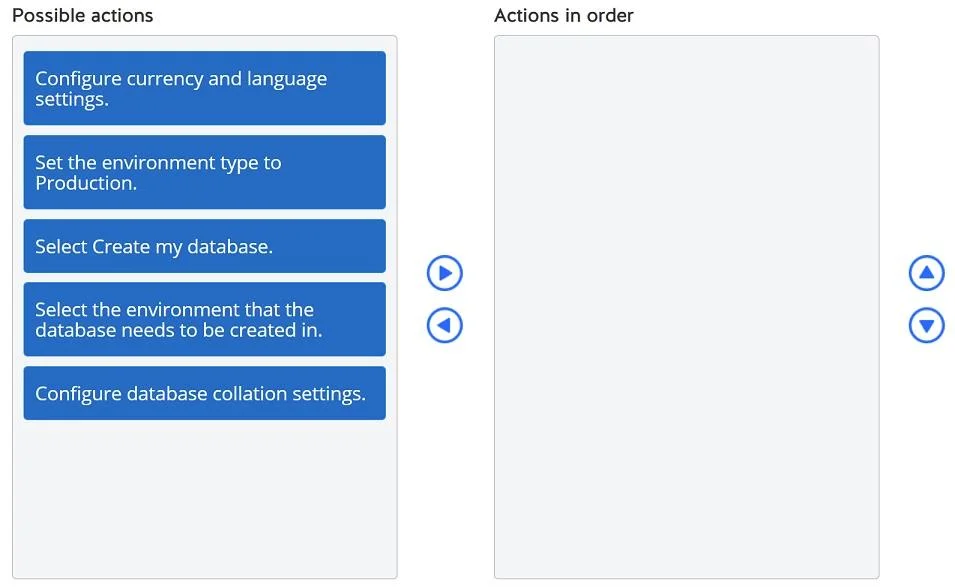
Answer Area
Drag items
Correct arrangement
- Select the environment that the database needs to be created in.
- Configure currency and language settings.
- Select Create my database.
Explanation
To create a Dataverse database in an existing Power Apps environment and configure its language, you must first select the environment, then define the currency and language settings, and finally initiate the database creation.
Approach. The correct sequence for creating a Dataverse database in an existing Power Apps environment and setting its language to French is as follows:
- Select the environment that the database needs to be created in. - Before any actions can be performed on an environment, it must first be selected within the Power Platform admin center. This navigates you to the specific environment's details page, where you can then initiate the database creation process.
- Configure currency and language settings. - When adding a Dataverse database to an environment that doesn't already have one, the system prompts you to define essential settings, including the default currency and the base language for the database. This is where 'French' would be selected. It's crucial to set this before the database is fully created to ensure the foundational language is correct from the start.
- Select Create my database. - After selecting the target environment and configuring the necessary initial settings like currency and language, the final step is to confirm and initiate the database creation. This action triggers the provisioning of the Dataverse database with the specified configurations.
Common mistakes.
- common_mistake. Other choices are incorrect for the following reasons:
- 'Set the environment type to Production.': While environment type is an important setting (Development, Sandbox, Production), it is generally set when the environment itself is created or can be changed later. It is not a direct step in the process of creating a Dataverse database or setting its language, and is not a prerequisite for these actions.
- 'Configure database collation settings.': Database collation settings are advanced technical configurations that affect how data is sorted and compared at a more fundamental database level (e.g., case sensitivity, accent sensitivity). While important for specific database operations, they are not the primary method for setting the 'language' as requested in the scenario (which refers to the display language and default language for Dataverse entities and localization), nor are they a standard step in the initial database creation wizard for setting the primary environment language. The 'Configure currency and language settings' option correctly addresses the requirement for setting the language to French for the client.
Concept tested. The underlying technical concept being tested is the proper workflow for managing Power Apps environments, specifically the creation of a Dataverse database within an existing environment and configuring its fundamental settings, such as the base language, using the Power Platform admin center.
Topics
Community Discussion
No community discussion yet for this question.