
NCA-5.15 · Question #18
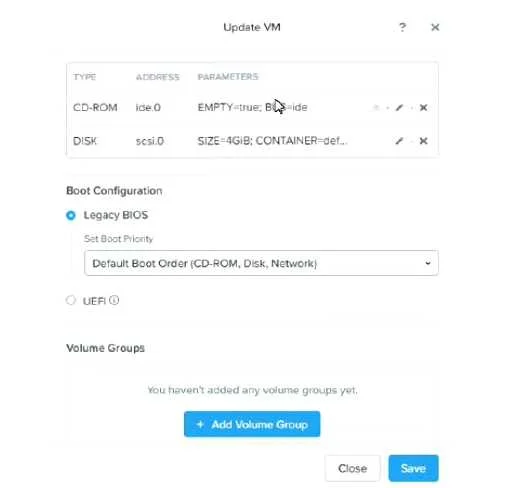
Refer to the exhibit. A team member has built a CentOS VM image for use as a template. An administrator deploys a new VM using the CentOS image as the 05 drive. No other drives are presented to the…
The correct answer is D. The CentOS VM image was built with UEF. When a CentOS VM image is built using UEFI firmware, the resulting template encodes UEFI boot expectations into the disk. If the target VM is configured for Legacy BIOS boot mode (or vice versa), there is a firmware mismatch and the VM will fail to boot entirely - regardless of…
Question
Refer to the exhibit. A team member has built a CentOS VM image for use as a template. An administrator deploys a new VM using the CentOS image as the 05 drive. No other drives are presented to the VM. Following the deployment, the administrator attempts to boot the VM, but is unsuccessful. What could be causing this issue?
Exhibit
Options
- AThe VMS Boot Priority must reference disk first before CD-ROW
- BThe VM's Disk (scsi.O) setting must be set to make this disk bootable
- CNo Volume Groups have been created for the VM
- DThe CentOS VM image was built with UEF:
How the community answered
(34 responses)- A18% (6)
- B9% (3)
- C3% (1)
- D71% (24)
Explanation
When a CentOS VM image is built using UEFI firmware, the resulting template encodes UEFI boot expectations into the disk. If the target VM is configured for Legacy BIOS boot mode (or vice versa), there is a firmware mismatch and the VM will fail to boot entirely - regardless of boot priority order or disk attachment. The fix is to ensure the VM's firmware setting (BIOS vs. UEFI) matches the firmware used when the template image was created. Options A and B are misconfigurations that would cause issues in other scenarios but are not the root cause here; Option C is irrelevant because LVM Volume Groups are a guest OS concern, not a hypervisor boot concern.
Topics
Community Discussion
No community discussion yet for this question.