
NCA-5.15 · Question #73
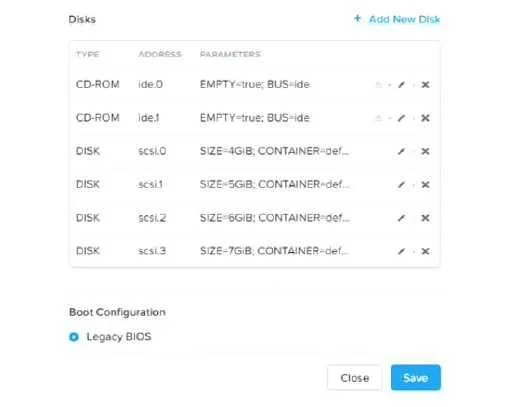
Refer to the exhibit. An administrator has created a new Windows VM and given it to the user. The user states that only the C drive mapping is visible within the Windows OS. What is causing this…
The correct answer is A. The user has not formatted and assigned drive letters to the additional disks. When additional virtual disks are attached to a Windows VM through Nutanix (via Prism), Windows recognizes them as raw, uninitialized disks. They will not appear as drive letters (e.g., D:, E:) in File Explorer until a user or administrator opens Disk Management (or uses…
Question
Refer to the exhibit. An administrator has created a new Windows VM and given it to the user. The user states that only the C drive mapping is visible within the Windows OS. What is causing this issue?
Exhibit
Options
- AThe user has not formatted and assigned drive letters to the additional disks.
- BThe additional disks have not been formatted as ExFAT in Prism Central.
- CThe administrator has not run the dd command line community utility.
- DThe additional disks were formatted as NTFS in Prism Central.
How the community answered
(22 responses)- A95% (21)
- C5% (1)
Explanation
When additional virtual disks are attached to a Windows VM through Nutanix (via Prism), Windows recognizes them as raw, uninitialized disks. They will not appear as drive letters (e.g., D:, E:) in File Explorer until a user or administrator opens Disk Management (or uses diskpart), initializes each disk, creates a volume/partition, formats it (typically NTFS), and assigns a drive letter.
- Option B is incorrect: disk formatting is done inside the guest OS, not in Prism Central. Prism only manages the virtual disk at the hypervisor/storage layer.
- Option C is incorrect:
ddis a Linux utility and is not applicable to adding disks to a Windows VM. - Option D is incorrect: Prism does not format disks as NTFS; disk formatting is always a guest OS operation.
Topics
Community Discussion
No community discussion yet for this question.