
MS-721 · Question #42
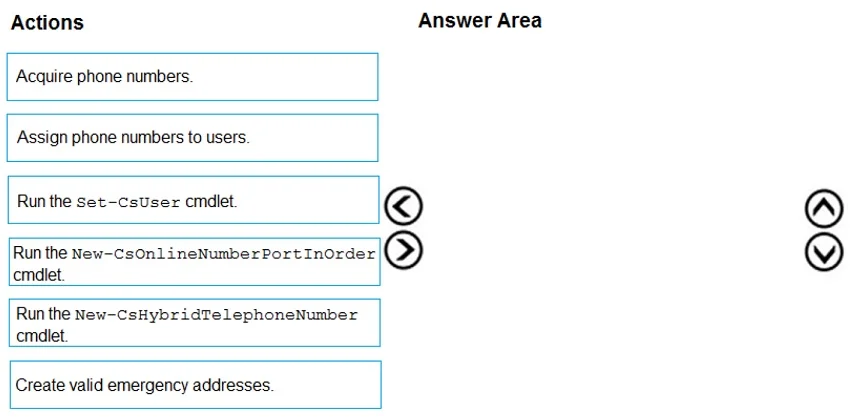
Drag and Drop Question From the Microsoft Teams admin center, you add an operator to Operator Connect. You need to enable users for Microsoft Teams Phone. Which three actions should you perform in…
The correct answer is Create valid emergency addresses.; Acquire phone numbers.; Assign phone numbers to users. To enable users for Microsoft Teams Phone via Operator Connect, the correct sequence of actions is to first create valid emergency addresses, then acquire phone numbers from the operator, and finally assign those acquired phone numbers to the users.
Question
Exhibit
Answer Area
Drag items
Correct arrangement
- Create valid emergency addresses.
- Acquire phone numbers.
- Assign phone numbers to users.
Explanation
To enable users for Microsoft Teams Phone via Operator Connect, the correct sequence of actions is to first create valid emergency addresses, then acquire phone numbers from the operator, and finally assign those acquired phone numbers to the users.
Approach. The correct interaction is to drag 'Create valid emergency addresses', 'Acquire phone numbers', and 'Assign phone numbers to users' into the 'Answer Area' in that specific order. This sequence is correct because: 1. 'Create valid emergency addresses' is a foundational step, as emergency calling (E911/E112) requires associating a physical location with a phone number for regulatory compliance and safety. You cannot reliably provision numbers for emergency services without these addresses. 2. 'Acquire phone numbers' is the next logical step; once the operator is connected and emergency addresses are ready, you can obtain the actual phone numbers from the operator through the Microsoft Teams admin center. 3. 'Assign phone numbers to users' is the final step in this sequence, as you must have acquired the numbers first before they can be assigned to individual users, effectively enabling them for Microsoft Teams Phone functionality with a unique direct dial number.
Common mistakes.
- common_mistake. Common mistakes include selecting PowerShell cmdlets like 'Run the Set-CsUser cmdlet', 'Run the New-CsOnlineNumberPortInOrder cmdlet', or 'Run the New-CsHybridTelephoneNumber cmdlet'. While these cmdlets exist and are used in specific scenarios (e.g., hybrid deployments, porting, or advanced configurations), the high-level administrative tasks for enabling users with Operator Connect typically follow a simpler workflow within the Teams admin center, which is represented by the 'Create', 'Acquire', and 'Assign' actions. Attempting to assign numbers before acquiring them, or acquiring numbers before establishing emergency addresses, would also be incorrect as it violates the logical prerequisites of the setup process.
Concept tested. The core concept being tested is the administrative workflow and required steps for enabling users for Microsoft Teams Phone System using Operator Connect, specifically focusing on the sequence of provisioning phone numbers and emergency services readiness in a cloud-first environment.
Topics
Community Discussion
No community discussion yet for this question.