
MS-721 · Question #341
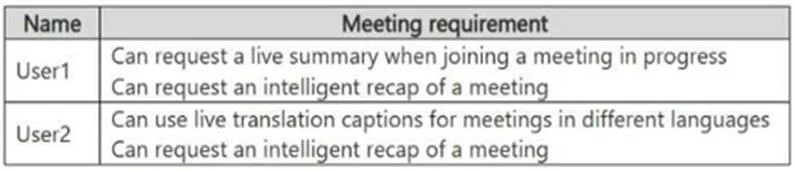
Drag and Drop Question You have a Microsoft Teams deployment. You have the users shown in the following table. You need to recommend add-on licenses. The solution must minimize costs. Which add-on…
The correct answer is Microsoft 365 Copilot; Microsoft 365 Copilot. To fulfill user-specific Microsoft Teams meeting requirements while minimizing costs, User1 needs Microsoft 365 Copilot for real-time summaries and intelligent recaps, while User2 requires Teams Premium for live translation captions and intelligent recaps.
Question
Exhibit
Answer Area
Drag items
Correct arrangement
- Microsoft 365 Copilot
- Microsoft 365 Copilot
Explanation
To fulfill user-specific Microsoft Teams meeting requirements while minimizing costs, User1 needs Microsoft 365 Copilot for real-time summaries and intelligent recaps, while User2 requires Teams Premium for live translation captions and intelligent recaps.
Approach. The correct approach involves identifying the specific features each user requires and matching them to the most appropriate and cost-effective add-on license.
For User1:
- 'Can request a live summary when joining a meeting in progress'
- 'Can request an intelligent recap of a meeting'
These capabilities, particularly the 'live summary when joining a meeting in progress' and overall intelligent recaps, are core functionalities of Microsoft 365 Copilot. Copilot acts as an AI assistant across Microsoft 365, including Teams, to provide real-time summaries, action items, and intelligent insights from meetings.
For User2:
- 'Can use live translation captions for meetings in different languages'
- 'Can request an intelligent recap of a meeting'
The requirement for 'live translation captions for meetings in different languages' is a key differentiating feature of Teams Premium. While Teams Premium also offers 'intelligent recap' capabilities, the live translation feature makes it the necessary choice for User2. Microsoft 365 Copilot does not natively provide live translation captions as a dedicated meeting feature for all languages.
Therefore, the correct assignments are:
- User1: Microsoft 365 Copilot
- User2: Teams Premium
Common mistakes.
- common_mistake. The most common mistake, as depicted in the third exhibit image, would be assigning 'Microsoft 365 Copilot' to both users. This is incorrect for User2 because Microsoft 365 Copilot, while excellent for intelligent recaps and summaries, does not provide the 'live translation captions for meetings in different languages' feature; this is a specific capability of Teams Premium. Assigning 'Communications Credits' would be wrong as they are for PSTN calling and audio conferencing. Assigning 'Teams Rooms Pro' would be wrong as it's for meeting room devices, not individual user meeting features. Assigning 'Teams Premium' to User1, while it provides intelligent recap, does not specifically target the 'live summary when joining a meeting in progress' as directly as Copilot, and would be a less precise (and potentially less cost-effective if Copilot is otherwise used) choice if Copilot's unique real-time AI summarization is what's implied for User1.
Concept tested. Microsoft Teams licensing, specifically understanding the advanced features offered by Microsoft 365 Copilot and Teams Premium add-on licenses, and how to apply them to user requirements to minimize costs.
Topics
Community Discussion
No community discussion yet for this question.