
MS-721 · Question #127
Case Study 2 - Contoso Overview General Overview The network contains an Active Directory forest named contoso.com that syncs to Microsoft 365 by using Azure AD Connect. Domain controllers run…
The correct answer is Deploy a local internet connection.; Implement VPN split tunneling. The correct interaction is to drag 'Deploy a local internet connection' to 'Vancouver facility users' and 'Implement VPN split tunneling' to 'Remote users' to optimize network connectivity for Microsoft 365 services.
Question
Exhibit
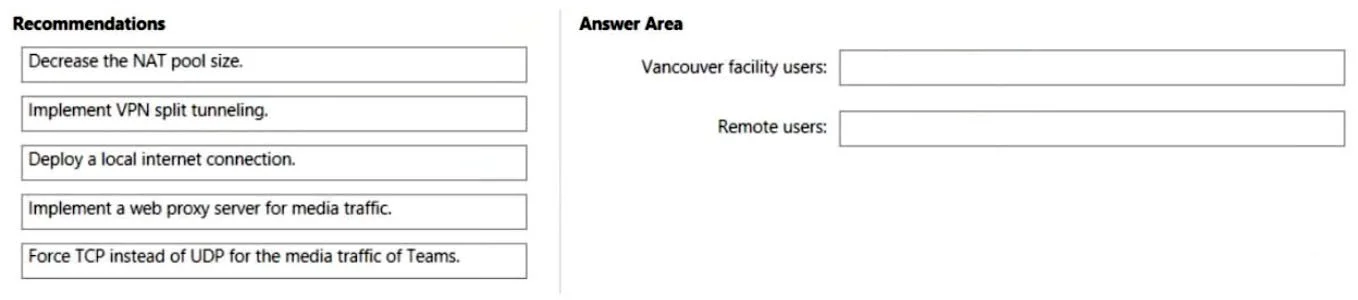
Answer Area
Drag items
Correct arrangement
- Deploy a local internet connection.
- Implement VPN split tunneling.
Explanation
The correct interaction is to drag 'Deploy a local internet connection' to 'Vancouver facility users' and 'Implement VPN split tunneling' to 'Remote users' to optimize network connectivity for Microsoft 365 services.
Approach. Based on the case study: The Vancouver facility's internet access is currently provided through the Toronto and London offices (i.e., backhauling internet traffic over the WAN). For a manufacturing facility, this setup can introduce significant latency and consume valuable WAN bandwidth, especially for cloud-based services like Microsoft 365 or real-time media. 'Deploy a local internet connection' (dragged to 'Vancouver facility users') is the optimal solution to provide direct and efficient access to internet-based resources, improving performance and reducing WAN congestion. For remote users, the case study states they connect via VPN and that 'Skype for Business Server traffic for the remote users is routed through the VPN connections.' This implies a full-tunnel VPN setup where all internet traffic, including to Microsoft 365 services, is routed through the corporate network. This increases latency, consumes corporate internet bandwidth, and degrades performance for cloud services. 'Implement VPN split tunneling' (dragged to 'Remote users') allows traffic destined for the internet (like M365 services) to bypass the VPN tunnel and go directly to the internet, while corporate network traffic still uses the VPN, thus optimizing performance for remote users accessing cloud resources.
Common mistakes.
- common_mistake. Other recommendations are incorrect: 'Decrease the NAT pool size' addresses IP address exhaustion, not network performance or routing bottlenecks. 'Implement a web proxy server for media traffic' is generally not recommended for real-time media in Microsoft 365/Teams, as it can introduce latency and is often bypassed for optimal performance. Additionally, a web proxy handles HTTP/HTTPS, not typically UDP-based real-time media. 'Force TCP instead of UDP for the media traffic of Teams' would degrade real-time media quality, as UDP is preferred for its lower latency and tolerance for packet loss; forcing TCP adds overhead and retransmission delays, which negatively impact real-time communication. These options do not resolve the core routing and performance issues identified for the Vancouver facility or remote users.
Concept tested. Network connectivity optimization for Microsoft 365, including internet breakout for branch offices and VPN split tunneling for remote users, to ensure optimal performance for cloud services and real-time communication (e.g., Teams/Skype for Business).
Topics
Community Discussion
No community discussion yet for this question.