
MS-721 · Question #237
Drag and Drop Question You have a Microsoft 365 E5 subscription. You have a phone that uses Microsoft Skype for Business 3PIP firmware and is connected to an on-premises Skype for Business 2019…
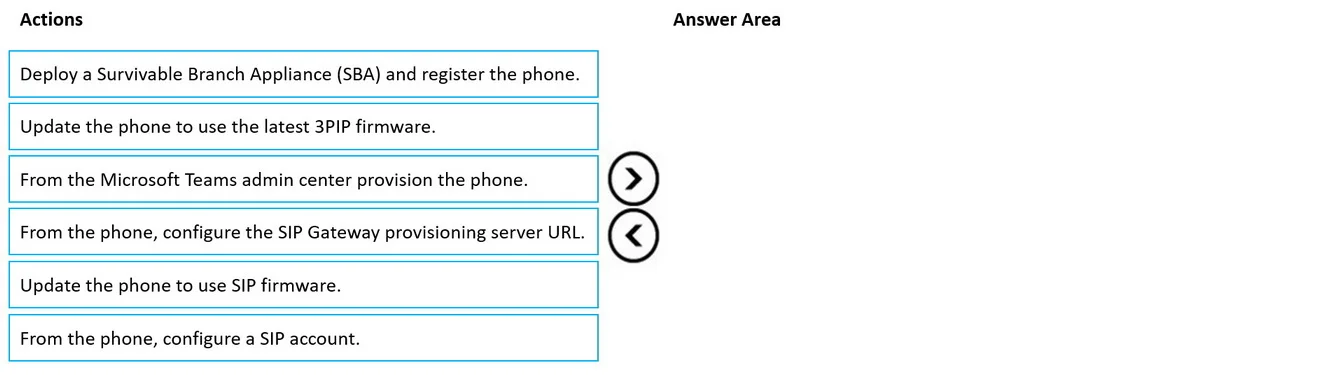
The correct answer is From the Microsoft Teams admin center provision the phone.; Update the phone to use the latest 3PIP firmware.; From the phone, configure the SIP Gateway provisioning server URL. To transition a Skype for Business 3PIP phone to Microsoft Teams Phone via SIP Gateway, the phone must first be provisioned in the Teams admin center, then updated with compatible firmware, and finally configured with the SIP Gateway provisioning URL.
Question
Exhibit
Answer Area
Drag items
Correct arrangement
- From the Microsoft Teams admin center provision the phone.
- Update the phone to use the latest 3PIP firmware.
- From the phone, configure the SIP Gateway provisioning server URL.
Explanation
To transition a Skype for Business 3PIP phone to Microsoft Teams Phone via SIP Gateway, the phone must first be provisioned in the Teams admin center, then updated with compatible firmware, and finally configured with the SIP Gateway provisioning URL.
Approach. The correct interaction is to drag the following three actions, in this specific order, to the 'Answer Area':
- From the Microsoft Teams admin center provision the phone. - Before a phone can connect to Microsoft Teams via SIP Gateway, the administrator must prepare the user and the device within the Teams admin center. This involves enabling SIP Gateway for the organization, assigning the appropriate IP Phone policies to the user, and ensuring the user is licensed for Teams Phone System. This step establishes the foundational configuration within the Teams environment for the phone.
- Update the phone to use the latest 3PIP firmware. - For a 3PIP phone, which originally used Skype for Business firmware, to successfully communicate with the Microsoft Teams SIP Gateway, it must be running a compatible firmware version. This update ensures the phone supports the necessary protocols and features required for Teams SIP Gateway integration.
- From the phone, configure the SIP Gateway provisioning server URL. - Once the phone has the correct firmware and the necessary backend provisioning is complete in the Teams admin center, the phone needs to know where to connect. Configuring the SIP Gateway provisioning server URL on the phone directs it to the Teams SIP Gateway service. The phone can then retrieve its configuration, register, and initiate the sign-in process, enabling it to make and receive calls through Teams.
Common mistakes.
- common_mistake. 1. 'Deploy a Survivable Branch Appliance (SBA) and register the phone.' - This is incorrect because SBAs are components of on-premises Skype for Business or Lync Server deployments, primarily for PSTN resiliency in branch offices when the WAN link to the central pool is down. They are not used for directly integrating 3PIP phones with Microsoft Teams Phone via a Calling Plan, which is a cloud-based solution. The Teams SIP Gateway provides the connectivity for these devices.
- 'Update the phone to use SIP firmware.' - While 3PIP firmware is SIP-based, this option is less precise than 'Update the phone to use the latest 3PIP firmware.' The scenario explicitly states the phone uses 'Microsoft Skype for Business 3PIP firmware,' so the specific action is to update that specific firmware to a Teams-compatible version, not a generic 'SIP firmware' which could imply a different type of device or a less specific upgrade path.
- 'From the phone, configure a SIP account.' - For phones connecting to Teams via SIP Gateway, you typically don't manually configure a generic SIP account with a username and password directly on the phone. Instead, the phone is directed to the SIP Gateway provisioning URL, which then guides it through a device registration and user sign-in flow (often web-based), where the user authenticates with their Teams credentials. The 'SIP account' configuration is usually abstracted or handled by the gateway's provisioning process, not a manual entry on the phone.
Concept tested. Migration of third-party IP phones (3PIP devices) from Skype for Business Server to Microsoft Teams Phone using the SIP Gateway feature, including the necessary administrative provisioning steps, firmware updates, and device-side configuration.
Topics
Community Discussion
No community discussion yet for this question.