
MS-721 · Question #123
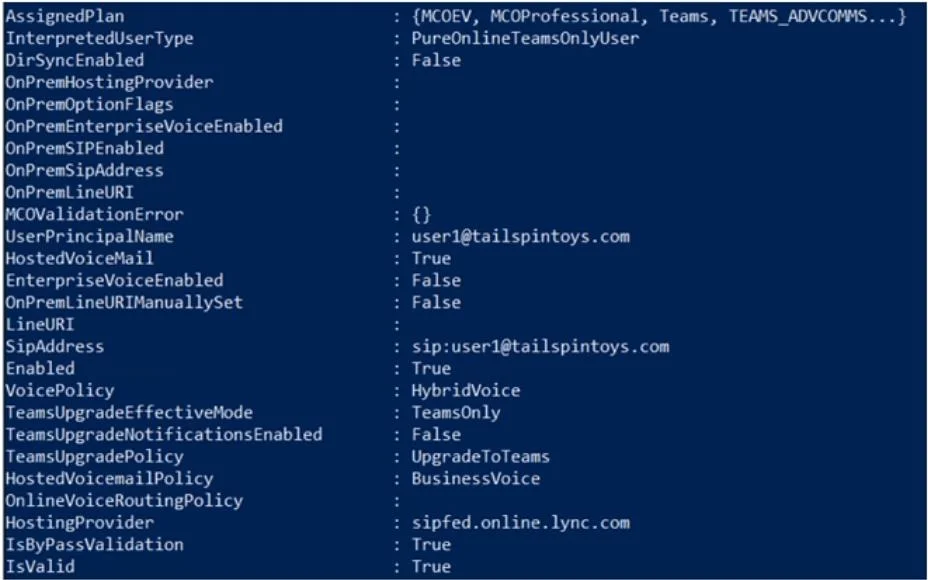
Your company has a Microsoft Teams Phone deployment that uses Direct Routing. A user named User1 reports that she cannot make calls because the dial pad is missing in Teams. You run the…
The correct answer is A. Run the Set-CsPhoneNumberAssignment cmdlet and specify the -PhoneNumber parameter. C. Run the Grant-CsOnlineVoiceRoutingPolicy cmdlet. In Microsoft Teams with Direct Routing, the dial pad disappears when a user is missing one or both of two key requirements: an assigned phone number and an Online Voice Routing Policy. Based on the Get-CsOnlineUser output (implied by the scenario), User1 lacks these. Action A…
Question
Exhibit
Options
- ARun the Set-CsPhoneNumberAssignment cmdlet and specify the -PhoneNumber parameter.
- BRun the Set-CsUser cmdlet and specify the -LineURI parameter
- CRun the Grant-CsOnlineVoiceRoutingPolicy cmdlet.
- DAssign a Microsoft 365 Phone System license to User1.
How the community answered
(28 responses)- A79% (22)
- B14% (4)
- D7% (2)
Explanation
In Microsoft Teams with Direct Routing, the dial pad disappears when a user is missing one or both of two key requirements: an assigned phone number and an Online Voice Routing Policy. Based on the Get-CsOnlineUser output (implied by the scenario), User1 lacks these. Action A (Set-CsPhoneNumberAssignment with -PhoneNumber) assigns a Direct Routing phone number to User1 - a phone number in E.164 format is mandatory for the dial pad to appear. Action C (Grant-CsOnlineVoiceRoutingPolicy) assigns the voice routing policy that tells Teams how to route PSTN calls through the SBC; without it, Teams won't allow PSTN dialing even if a number is assigned. Option B (Set-CsUser -LineURI) is the legacy method replaced by Set-CsPhoneNumberAssignment and is not the current correct approach. Option D is irrelevant because the Phone System license is already assumed present - Direct Routing requires it, and a missing license would surface differently.
Topics
Community Discussion
No community discussion yet for this question.