
MS-721 · Question #105
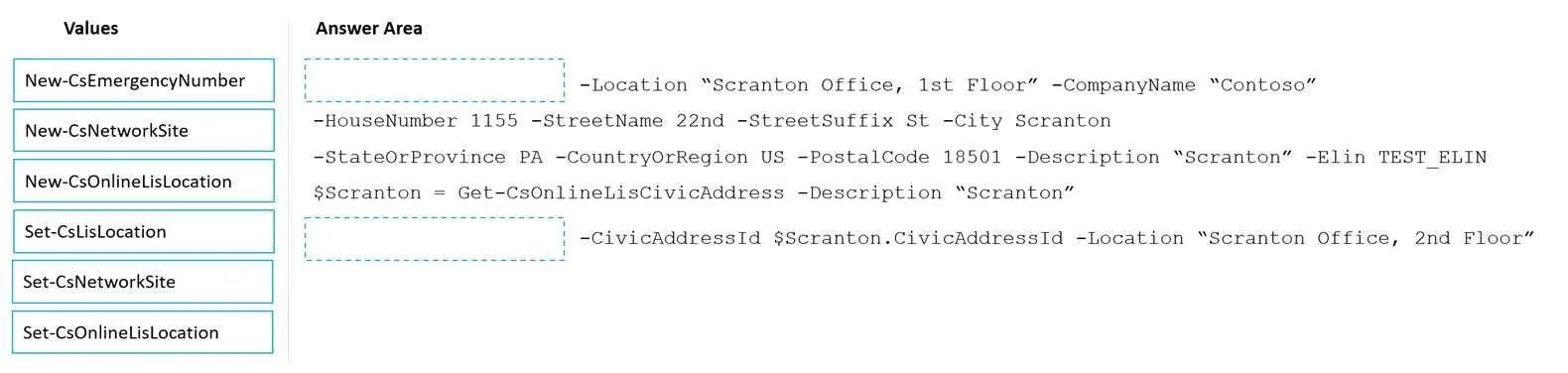
Drag and Drop Question Your company has offices throughout the United States. The company is opening a new office in Scranton. The office will occupy two floors in the same building. You need to…
The correct answer is New-CsOnlineLisLocation; Set-CsOnlineLisLocation. To configure emergency calling for different floors within the same building, first create a new online LIS location for the first floor and then set an online LIS location for the second floor, linking it to the same civic address.
Question
Exhibit
Answer Area
Drag items
Correct arrangement
- New-CsOnlineLisLocation
- Set-CsOnlineLisLocation
Explanation
To configure emergency calling for different floors within the same building, first create a new online LIS location for the first floor and then set an online LIS location for the second floor, linking it to the same civic address.
Approach. For the first blank, the script is defining a new civic address with detailed street, city, state, and postal code information, alongside a logical '1st Floor' location. This requires a cmdlet that creates a new online LIS location entry. New-CsOnlineLisLocation is the correct cmdlet for this purpose. It creates an association between a logical location string and a civic address, and can define the civic address simultaneously. For the second blank, the script uses the -CivicAddressId parameter from a previously retrieved civic address ($Scranton.CivicAddressId) and associates it with a new logical location 'Scranton Office, 2nd Floor'. This action is modifying or setting a new logical location against an existing civic address ID. The Set-CsOnlineLisLocation cmdlet is used to associate a logical location (like a floor name) with an existing civic address ID in the online environment, allowing multiple logical locations to map to the same physical address.
Common mistakes.
- common_mistake. Incorrectly using
New-CsNetworkSiteorSet-CsNetworkSitewould be wrong because these cmdlets are for configuring network sites (which can be linked to subnets) and are not directly used for defining the precise civic address and logical location mapping for emergency services.New-CsEmergencyNumberis for defining emergency numbers, not locations. UsingNew-CsOnlineLisLocationfor the second blank would be incorrect because you are not creating a new civic address, but rather associating a new logical location with an existing civic address ID. Similarly, usingSet-CsLisLocationwould be incorrect asCsOnlinecmdlets are specifically for the online (cloud) environment, implied by the use ofNew-CsOnlineLisLocationin the first step and the general context of modern Teams/SfB Online deployments.
Concept tested. Emergency Location Information Service (LIS) configuration in Microsoft Teams/Skype for Business Online, specifically how to define and associate civic addresses and logical locations (like floors) for Enhanced 911 (E911) services using PowerShell.
Topics
Community Discussion
No community discussion yet for this question.