
MS-720 · Question #86
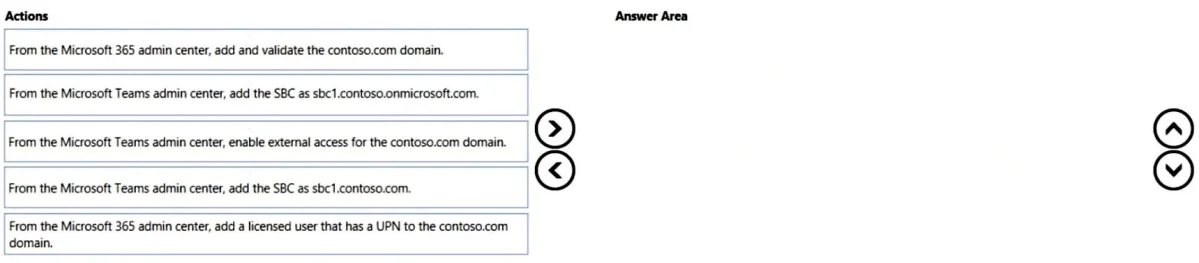
Drag and Drop Question You have a Microsoft Teams Phone deployment. When you attempt to deploy a Session Border Controller (SBC) named sfac1xontoso.com. you receive the following error message: "We…
The correct answer is From the Microsoft Teams admin center, upload the MAC address of the device; From the Microsoft Teams admin center, generate a verification code; Instruct the user to enter the verification code on the device; From the Microsoft Teams admin center, remotely sign-in a user to the device. To deploy a Microsoft Teams Phone Session Border Controller (SBC) with a custom domain, the custom domain must first be added and validated in Microsoft 365, followed by adding the SBC in the Teams admin center, and finally provisioning a licensed user with a UPN matching the…
Question
Exhibit
Answer Area
Drag items
Correct arrangement
- From the Microsoft Teams admin center, upload the MAC address of the device
- From the Microsoft Teams admin center, generate a verification code
- Instruct the user to enter the verification code on the device
- From the Microsoft Teams admin center, remotely sign-in a user to the device
Explanation
To deploy a Microsoft Teams Phone Session Border Controller (SBC) with a custom domain, the custom domain must first be added and validated in Microsoft 365, followed by adding the SBC in the Teams admin center, and finally provisioning a licensed user with a UPN matching the custom domain.
Approach. The problem states an error: 'We can't use the 'SBC1-Contoso.com' domain as it hasn't been set up in the organization.' This clearly indicates that the 'contoso.com' domain needs to be added and validated in Microsoft 365 first.
Therefore, the correct sequence of actions is:
-
From the Microsoft 365 admin center, add and validate the contoso.com domain. - This directly addresses the error message and is a prerequisite for using any custom domain with Microsoft 365 services, including Teams Direct Routing.
-
From the Microsoft Teams admin center, add the SBC as sbc1.contoso.com. - Once the custom domain is validated, the Session Border Controller can be registered in the Teams admin center using its fully qualified domain name (FQDN), which includes the custom domain.
-
From the Microsoft 365 admin center, add a licensed user that has a UPN to the contoso.com domain. - For Microsoft Teams Direct Routing to function and for users to be able to make and receive calls via the SBC, they must have a valid user principal name (UPN) in the custom domain and be assigned the necessary Teams Phone System license. This completes the setup necessary for users to leverage the SBC.
Common mistakes.
- common_mistake. 1. Adding the SBC as sbc1.onmicrosoft.com: The problem explicitly states the SBC name is sbc1.contoso.com. Using the .onmicrosoft.com domain would bypass the custom domain requirement and not solve the original error.
- Enabling external access for the contoso.com domain: While external access (federation) is an important Teams feature, it is unrelated to the process of adding an SBC for Direct Routing within the organization or validating a custom domain. It does not resolve the 'domain hasn't been set up' error.
- Incorrect order of operations: Attempting to add the SBC before the custom domain is validated, or adding users before the SBC is configured, would lead to further errors or an incomplete setup. Domain validation is always the foundational step when using custom domains with Microsoft 365 services.
Concept tested. Microsoft Teams Direct Routing deployment, custom domain management in Microsoft 365, and user provisioning for Teams Phone System.
Topics
Community Discussion
No community discussion yet for this question.