
MS-720 · Question #87
Drag and Drop Question A user uses the Microsoft Teams client on a Windows device. The user reports call failures. You need to send the Teams client logs to Microsoft support to troubleshoot the…
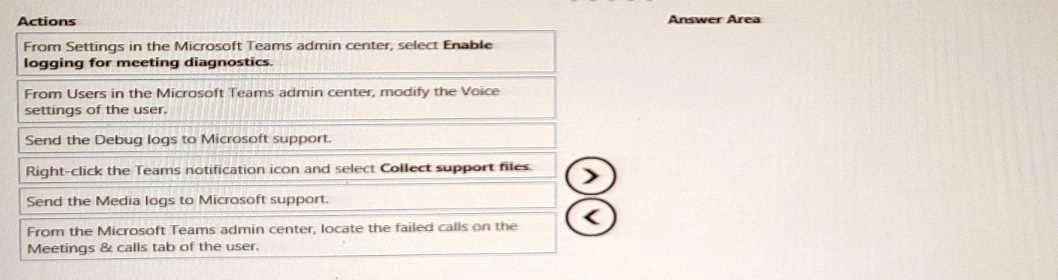
The correct answer is From Settings in the Microsoft Teams admin center, select Enable logging for meeting diagnostics.; From the Microsoft Teams admin center, locate the failed calls on the Meetings & calls tab of the user.; Right-click the Teams notification icon and select Collect support files. To troubleshoot Microsoft Teams call failures, collect client support files and then send the relevant debug and media logs to Microsoft support in sequence.
Question
Exhibit
Answer Area
Drag items
Correct arrangement
- From Settings in the Microsoft Teams admin center, select Enable logging for meeting diagnostics.
- From the Microsoft Teams admin center, locate the failed calls on the Meetings & calls tab of the user.
- Right-click the Teams notification icon and select Collect support files.
Explanation
To troubleshoot Microsoft Teams call failures, collect client support files and then send the relevant debug and media logs to Microsoft support in sequence.
Approach. The scenario requires sending 'Teams client logs' to Microsoft support to troubleshoot 'call failures'. The correct approach involves three sequential actions:
-
Right-click the Teams notification icon and select Collect support files. This is the standard and correct method for an end-user to generate and gather all necessary diagnostic logs directly from the Microsoft Teams client application on their Windows device. These 'support files' are typically bundled into a ZIP file and contain various logs, including desktop logs, debug logs, and media logs.
-
Send the Debug logs to Microsoft support. After collecting the support files, the next logical step is to provide them to Microsoft support. The collected support files include 'debug logs' (often named
MSTeams Diagnostics Log), which contain general client activity, signaling information, and error details crucial for diagnosing various aspects of call failures that might not be purely media-related. -
Send the Media logs to Microsoft support. For 'call failures', especially those specifically involving audio, video, or screen sharing quality, 'media logs' (e.g.,
MSTeams Media Log) are equally important. These logs provide detailed information about the media streams, codecs, and network conditions affecting the call quality. Since 'call failures' can encompass both signaling and media issues, sending both debug and media logs from the collected bundle provides comprehensive information to Microsoft support. The question requires three actions, and after collection, sending both relevant log types is the most complete and logical sequence for troubleshooting general call failures.
The sequence ensures that the logs are first generated (collected) and then the two most critical types of diagnostic data for call failures (debug and media logs) are transmitted to support.
Common mistakes.
- common_mistake. Several options are incorrect because they either focus on administrative actions, modify settings instead of collecting logs, or are not directly relevant to gathering and sending client logs for troubleshooting:
- 'From Settings in the Microsoft Teams admin center, select Enable logging for meeting diagnostics.': This enables server-side diagnostics and is typically a proactive administrative task. It does not directly generate client-side logs for a user-reported, already-occurred call failure, nor is it how a user sends client logs.
- 'From Users in the Microsoft Teams admin center, modify the Voice settings of the user.': This action is for an administrator to change user settings to potentially resolve an issue, not for collecting or sending diagnostic logs.
- 'From the Microsoft Teams admin center, locate the failed calls on the Meetings & calls tab of the user.': While useful for an administrator to analyze call quality data from the server's perspective, this does not involve collecting or sending the 'Teams client logs' from the user's device, which is the specific requirement of the question.
- Sending only 'Debug logs' or only 'Media logs' if another option for a critical log type exists: For general 'call failures', both debug logs (for signaling/client behavior) and media logs (for audio/video stream issues) are typically vital for comprehensive troubleshooting. Omitting one when the option to send it is available might lead to incomplete troubleshooting information, especially when three actions are required.
Concept tested. Troubleshooting Microsoft Teams client issues, specifically understanding the process of collecting client-side diagnostic logs (support files) and identifying the relevant types of logs (debug logs, media logs) for diagnosing call failures for submission to Microsoft support.
Topics
Community Discussion
No community discussion yet for this question.