
MS-720 · Question #42
Drag and Drop Question From Voice in the Microsoft Teams admin center, you select Operators and add an operator. You need to enable users for Microsoft Teams Phone. Which three actions should you…
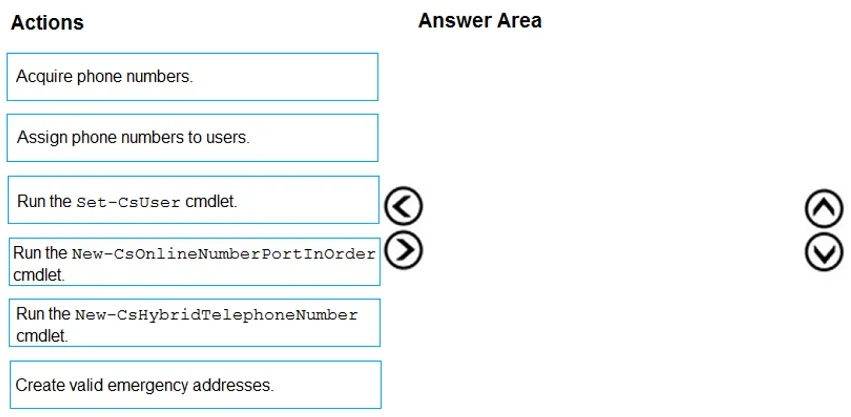
The correct answer is Create valid emergency addresses.; Acquire phone numbers.; Assign phone numbers to users. To enable users for Microsoft Teams Phone, the correct sequential actions are to first create emergency addresses, then acquire phone numbers, and finally assign those numbers to users.
Question
Exhibit
Answer Area
Drag items
Correct arrangement
- Create valid emergency addresses.
- Acquire phone numbers.
- Assign phone numbers to users.
Explanation
To enable users for Microsoft Teams Phone, the correct sequential actions are to first create emergency addresses, then acquire phone numbers, and finally assign those numbers to users.
Approach. The correct interaction is to drag 'Create valid emergency addresses', 'Acquire phone numbers', and 'Assign phone numbers to users' into the 'Answer Area' in that precise order. This sequence represents the logical and necessary steps to enable users for Microsoft Teams Phone in a new or expanded deployment:
- Create valid emergency addresses: Before any phone numbers can be used, especially for external calling, it is critical to configure emergency addresses (also known as E911 locations or dynamic emergency calling locations). These addresses ensure that emergency services can be dispatched to the correct physical location if a user dials an emergency number. This is a foundational regulatory and safety requirement.
- Acquire phone numbers: Once emergency addresses are in place, the next step is to obtain the actual phone numbers that users will utilize. In the context of an 'operator' being added, this typically means acquiring numbers through Microsoft (Calling Plans), a third-party operator (Operator Connect), or using Direct Routing to leverage existing numbers via a Session Border Controller (SBC). The 'Acquire phone numbers' action is a general representation of this step.
- Assign phone numbers to users: After phone numbers have been acquired, they must be assigned to individual users in the Microsoft Teams admin center. This links a specific phone number to a user's Teams account, allowing them to make and receive calls via the Teams Phone System, assuming they have the appropriate Teams Phone System license enabled.
Common mistakes.
- common_mistake. Common mistakes often involve incorrectly selecting or ordering the PowerShell cmdlets.
- Running Set-CsUser cmdlet: While this cmdlet is used to configure user properties (like enabling enterprise voice or setting a LineUri), it is a more granular, post-assignment step or a step that assumes numbers are already available. The question asks for the primary sequence of 'enabling users' from a high level, starting with number acquisition, not fine-tuning a user's voice settings directly.
- Running New-CsOnlineNumberPortInOrder cmdlet: This cmdlet is specifically for porting existing phone numbers from another carrier to Microsoft Teams Phone. The question implies a general enablement process that may involve new numbers or existing numbers (via Operator Connect/Direct Routing), but 'Acquire phone numbers' is a broader and more appropriate initial step when considering the overall flow, not specifically porting.
- Running New-CsHybridTelephoneNumber cmdlet: This cmdlet is relevant only in hybrid Skype for Business/Teams deployments where telephone numbers are managed in a hybrid fashion. The question does not specify a hybrid environment, and the 'adding an operator' context points more towards cloud-centric number management (Calling Plans, Operator Connect, or Direct Routing for cloud users). Therefore, this cmdlet is not a universally applicable step for enabling users for Teams Phone in all scenarios.
Concept tested. The core concept being tested is the end-to-end workflow and prerequisites for enabling users for Microsoft Teams Phone System, including the sequential steps of emergency address configuration, phone number acquisition, and phone number assignment to users. It assesses knowledge of Microsoft Teams Voice capabilities and administrative procedures.
Topics
Community Discussion
No community discussion yet for this question.