
MS-720 · Question #123
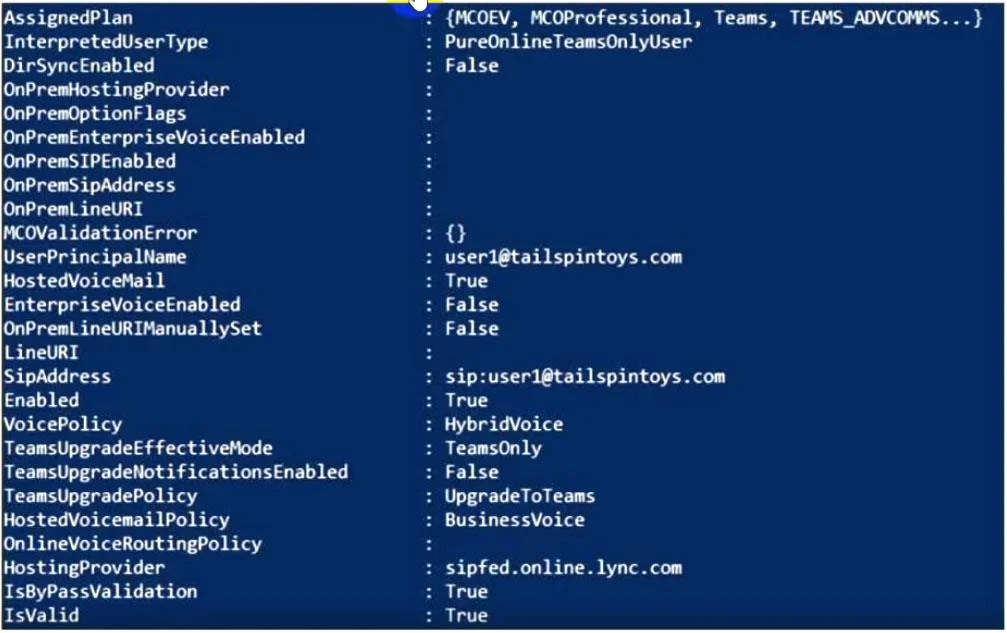
Your company has a Microsoft Teams Phone deployment that uses Direct Routing. A user named User1 reports that she cannot make calls because the dial pad is missing in Teams. You run the…
The correct answer is A. Run the Set-CsUser cmdlet and set the -EnterpriseVoiceEnabled parameter to $True. D. Run the Set-CsUser cmdlet and specify the -LineURI parameter. E. Run the Grant-CsOnlineVoiceRoutingPolicy cmdlet. For the dial pad to appear in Teams with Direct Routing, three things must be true simultaneously: the user must be Enterprise Voice enabled (A), have a phone number assigned via LineURI (D), and have an Online Voice Routing Policy that tells Teams how to route calls through…
Question
Exhibit
Options
- ARun the Set-CsUser cmdlet and set the -EnterpriseVoiceEnabled parameter to $True.
- BRun the Set-CsUser cmdlet and specify the -onPremLineURI parameter.
- CAssign a Microsoft 365 Phone System license to User1.
- DRun the Set-CsUser cmdlet and specify the -LineURI parameter.
- ERun the Grant-CsOnlineVoiceRoutingPolicy cmdlet.
How the community answered
(46 responses)- A83% (38)
- B11% (5)
- C7% (3)
Explanation
For the dial pad to appear in Teams with Direct Routing, three things must be true simultaneously: the user must be Enterprise Voice enabled (A), have a phone number assigned via LineURI (D), and have an Online Voice Routing Policy that tells Teams how to route calls through the SBC (E). The exhibit from Get-CsOnlineUser likely shows all three of these are missing or misconfigured for User1.
Why B is wrong: -OnPremLineURI is used in hybrid scenarios where the user object is mastered on-premises Active Directory. For cloud-only Direct Routing users, -LineURI (option D) is the correct parameter.
Why C is wrong: The exhibit output from Get-CsOnlineUser would show the Phone System license is already assigned - the issue is configuration, not licensing. (If the license were missing, Teams wouldn't even recognize the user as voice-capable at all.)
Memory tip: Think of it as a three-legged stool - Enable (EnterpriseVoiceEnabled), Number (LineURI), Route (VoiceRoutingPolicy). Remove any one leg and the dial pad falls over. The exam loves testing that all three must be present together; knowing that onPremLineURI is only for hybrid users and that licensing is a prerequisite (not a fix) will help you eliminate B and C quickly.
Topics
Community Discussion
No community discussion yet for this question.