
MS-720 · Question #126
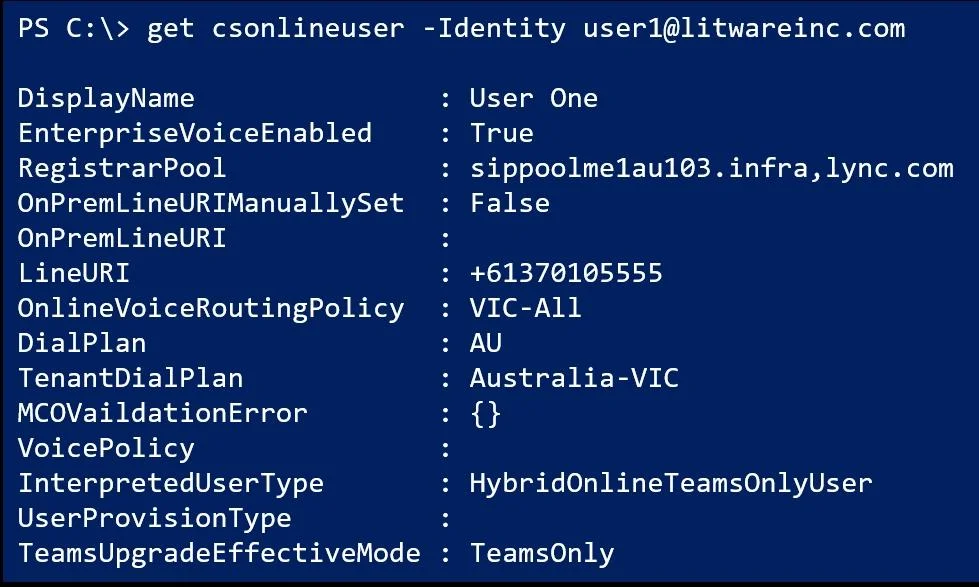
You have a Microsoft Teams Phone deployment. The 613 7010 5XXX phone number range is allocated to the Session Border Controller (SBC). A user named User1 is configured as shown in the following…
The correct answer is C. Set-CsUser [email protected] -OnPremLineURI "tel:+61370105555" D. Set-CsUser [email protected] -EnterpriseVoiceEnabled $false. C is correct because the phone range is allocated to the SBC, meaning this is a Direct Routing deployment - which requires numbers to be assigned via Set-CsUser -OnPremLineURI, not via Set-CsOnlineVoiceUser -TelephoneNumber (which is for Calling Plans). D…
Question
Exhibit
Options
- AGrant-CsOnlineVoiceRoutingPolicy -Identity [email protected] -PolicyName $null
- BSet-CsOnlineVoiceUser [email protected] -TelephoneNumber $null
- CSet-CsUser [email protected] -OnPremLineURI "tel:+61370105555"
- DSet-CsUser [email protected] -EnterpriseVoiceEnabled $false
- ESet-CsOnlineVoiceUser [email protected] -TelephoneNumber "+61370105555"
How the community answered
(29 responses)- A10% (3)
- B3% (1)
- C79% (23)
- E7% (2)
Explanation
C is correct because the phone range is allocated to the SBC, meaning this is a Direct Routing deployment - which requires numbers to be assigned via Set-CsUser -OnPremLineURI, not via Set-CsOnlineVoiceUser -TelephoneNumber (which is for Calling Plans). D (-EnterpriseVoiceEnabled $true) is correct because the exhibit shows Enterprise Voice is disabled for User1; without it enabled, the user's DID number is not presented as caller ID on outbound calls, and inbound routing through the SBC cannot complete.
Why the distractors are wrong:
- A removes the voice routing policy entirely, which would break outbound calling - the opposite of what's needed.
- B nulls out
TelephoneNumber, which is a Calling Plan field and irrelevant to this Direct Routing scenario. - E uses
Set-CsOnlineVoiceUser -TelephoneNumber, the Calling Plan cmdlet - wrong for SBC/Direct Routing; it will not map the number through the SBC correctly.
Memory tip: Think "SBC = Set-CsUser + OnPremLineURI." Whenever you see a Session Border Controller, you're in Direct Routing territory - use the CsUser cmdlet with OnPremLineURI, never CsOnlineVoiceUser with TelephoneNumber. If a user can dial out but has no caller ID, check EnterpriseVoiceEnabled first.
Topics
Community Discussion
No community discussion yet for this question.