
MS-720 · Question #136
Your company has a Microsoft Teams Phone deployment that uses Direct Routing. A user named User1 reports that she cannot make calls because the dial pad is missing in Teams. You run the…
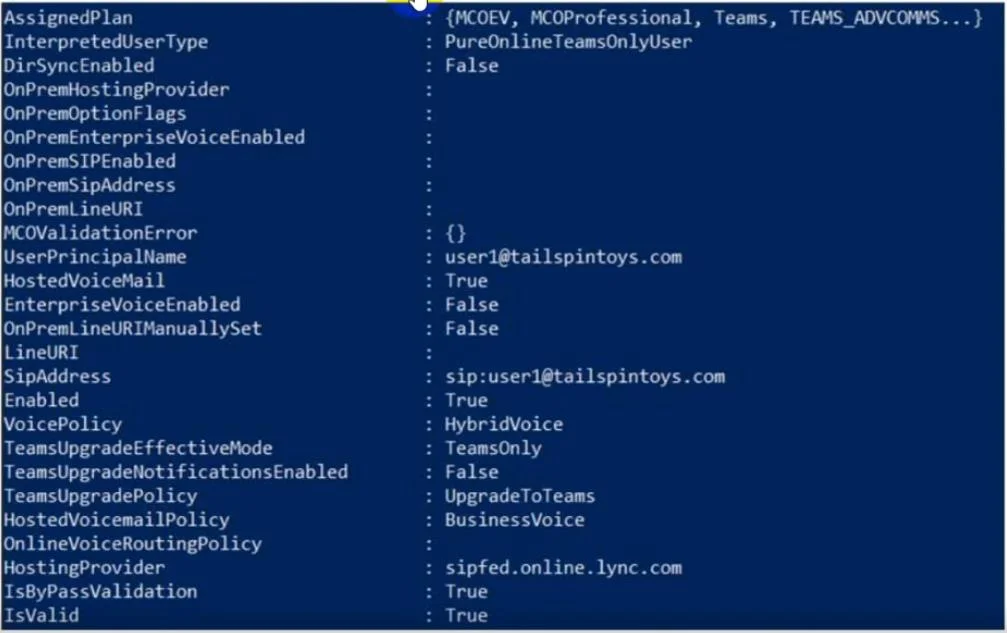
The correct answer is A. Run the Set-CsUser cmdlet and set the -EnterpriseVoiceEnabled parameter to $True. D. Run the Set-CsUser cmdlet and specify the -LineURI parameter. E. Run the Grant-CsOnlineVoiceRoutingPolicy cmdlet. For Direct Routing deployments, three conditions must be met before the Teams dial pad appears: the user must have Enterprise Voice enabled (-EnterpriseVoiceEnabled $True via Set-CsUser), a phone number assigned via -LineURI (also Set-CsUser, since LineURI is the Direct Routing…
Question
Exhibit
Options
- ARun the Set-CsUser cmdlet and set the -EnterpriseVoiceEnabled parameter to $True.
- BRun the Set-CsPhoneNumberAssignment cmdlet and specify the -PhoneNumber parameter.
- CAssign a Microsoft Teams Phone Standard license to User1.
- DRun the Set-CsUser cmdlet and specify the -LineURI parameter.
- ERun the Grant-CsOnlineVoiceRoutingPolicy cmdlet.
How the community answered
(44 responses)- A70% (31)
- B9% (4)
- C20% (9)
Explanation
For Direct Routing deployments, three conditions must be met before the Teams dial pad appears: the user must have Enterprise Voice enabled (-EnterpriseVoiceEnabled $True via Set-CsUser), a phone number assigned via -LineURI (also Set-CsUser, since LineURI is the Direct Routing method - not the Calling Plan cmdlet), and an Online Voice Routing Policy granted via Grant-CsOnlineVoiceRoutingPolicy so Teams knows how to route calls through the SBC. The exhibit likely shows all three of these as missing or misconfigured for User1.
B is wrong because Set-CsPhoneNumberAssignment -PhoneNumber is used for Microsoft Calling Plans and Operator Connect - not Direct Routing; Direct Routing assigns numbers via -LineURI on Set-CsUser. C is wrong because the exhibit implies the Teams Phone Standard license is already assigned (otherwise the licensing check would be the first fix, and the question wouldn't need three PowerShell-centric answers).
Memory tip: For Direct Routing dial pad troubleshooting, remember "EVR" - EnterpriseVoiceEnabled, Voice routing policy (Grant-CsOnlineVoiceRoutingPolicy), Reachable number (LineURI). All three must be green before the dial pad lights up.
Topics
Community Discussion
No community discussion yet for this question.