
MS-102 · Question #582
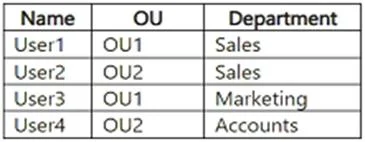
Your network contains an on-premises Active Directory Domain Services (AD DS) domain. The domain contains two organizational units (OUs) named OU1 and OU2 and the users shown in the following table…
The correct answer is D. attribute-based filtering. To sync specific departments (users) from on-premises Active Directory to Microsoft Entra ID while excluding others, use Microsoft Entra Connect Sync filtering. Specifically, OU-based filtering (selecting only the OUs containing the desired departments) or attribute-based…
Question
Your network contains an on-premises Active Directory Domain Services (AD DS) domain. The domain contains two organizational units (OUs) named OU1 and OU2 and the users shown in the following table. You have a Microsoft Entra tenant. You plan to sync the domain with the Microsoft Entra tenant by using Microsoft Entra Connect Sync. You need to ensure that only users in the sales and marketing departments sync with the tenant. The solution must minimize administrative effort. What should you configure in Microsoft Entra Connect?
Exhibit
Options
- AOU-based filtering
- Bdomain-based filtering
- Cgroup-based filtering
- Dattribute-based filtering
How the community answered
(67 responses)- A7% (5)
- B12% (8)
- C3% (2)
- D78% (52)
Explanation
To sync specific departments (users) from on-premises Active Directory to Microsoft Entra ID while excluding others, use Microsoft Entra Connect Sync filtering. Specifically, OU-based filtering (selecting only the OUs containing the desired departments) or attribute-based filtering (e.g., using a custom attribute to include/exclude) are the most effective methods. Key Methods for Filtering: * OU Filtering: During configuration, deselect the OU containing the department you do not want to sync. [Will not work here] *-> Attribute Filtering: Configure Entra Connect to only sync users where a specific attribute (e.g., department or a custom extension attribute) matches a required value. https://learn.microsoft.com/en-us/entra/identity/hybrid/connect/how-to-connect-sync-configure-
Topics
Community Discussion
No community discussion yet for this question.