
MS-102 · Question #29
Your network contains an on-premises Active Directory domain named contoso.com. The domain contains the objects shown in the following table. You configure Azure AD Connect to sync contoso.com to…
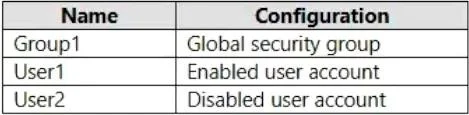
The correct answer is D. Group1, User1, and User2. Global security groups from your on-premises AD are synchronized to Azure AD, and they retain their membership and other attributes during the synchronization process. This means that if you have global security groups defined in your on-premises AD and these groups contain…
Question
Your network contains an on-premises Active Directory domain named contoso.com. The domain contains the objects shown in the following table. You configure Azure AD Connect to sync contoso.com to Azure AD. Which objects will sync to Azure AD?
Exhibit
Options
- AGroup1 only
- BUser1 and User2 only
- CGroup1 and User1 only
- DGroup1, User1, and User2
How the community answered
(23 responses)- A9% (2)
- C4% (1)
- D87% (20)
Explanation
Global security groups from your on-premises AD are synchronized to Azure AD, and they retain their membership and other attributes during the synchronization process. This means that if you have global security groups defined in your on-premises AD and these groups contain users or other groups, the membership information will be replicated to Azure AD. Disabled user accounts are also synchronized: https://learn.microsoft.com/en- us/answers/questions/233667/will-azure-ad-connect-sync-disabled-user-accounts
Topics
Community Discussion
No community discussion yet for this question.