
MS-102 · Question #142
Your network contains an on-premises Active Directory domain. You have a Microsoft 365 subscription. You implement a directory synchronization solution that uses pass-through authentication. You…
The correct answer is A. From a domain controller, install the Azure AD Password Protection Proxy. D. From all the domain controllers, install the Azure AD Password Protection DC Agent. E. From Password protection for Windows Server Active Directory, modify the Mode setting. To enforce Azure AD Password Protection's banned password list for on-premises Active Directory users with pass-through authentication, you must deploy the necessary agents and proxy, then configure the enforcement mode.
Question
Your network contains an on-premises Active Directory domain. You have a Microsoft 365 subscription. You implement a directory synchronization solution that uses pass-through authentication. You configure Azure AD smart lockout as shown in the following exhibit. You discover that Active Directory users can use the passwords in the custom banned passwords list. You need to ensure that banned passwords are banned for all users. Which three actions should you perform? Each correct answer presents part of the solution. NOTE: Each correct selection is worth one point.
Exhibit
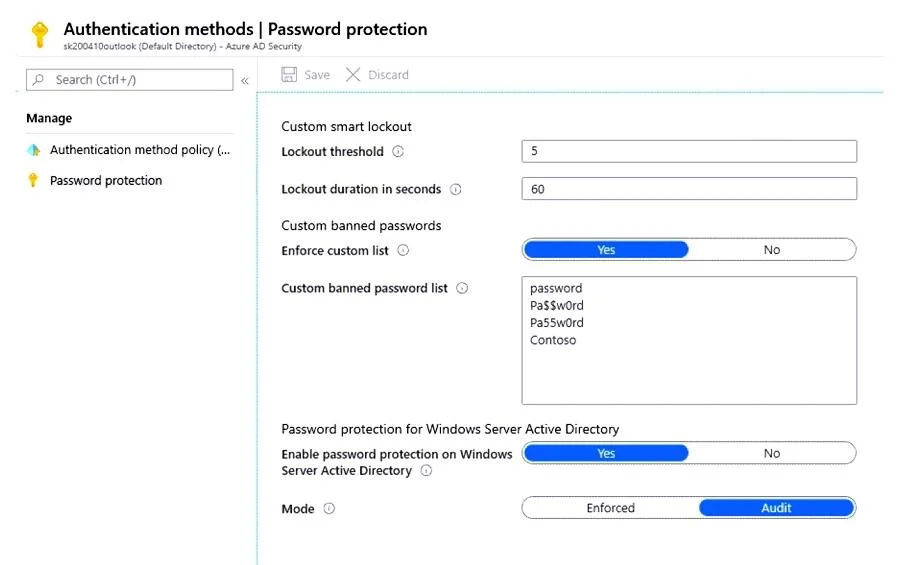
Options
- AFrom a domain controller, install the Azure AD Password Protection Proxy.
- BFrom Active Directory, modify the Default Domain Policy.
- CFrom a domain controller, install the Azure AD Application Proxy connector.
- DFrom all the domain controllers, install the Azure AD Password Protection DC Agent.
- EFrom Password protection for Windows Server Active Directory, modify the Mode setting.
- FFrom Custom banned passwords, modify the Enforce custom list setting.
How the community answered
(43 responses)- A74% (32)
- B16% (7)
- C7% (3)
- F2% (1)
Why each option
To enforce Azure AD Password Protection's banned password list for on-premises Active Directory users with pass-through authentication, you must deploy the necessary agents and proxy, then configure the enforcement mode.
The Azure AD Password Protection Proxy service acts as a crucial communication component, allowing on-premises domain controllers to securely validate password changes against Azure AD's global and custom banned password lists.
Modifying the Default Domain Policy controls traditional Active Directory password settings and does not integrate with or extend Azure AD Password Protection's banned password list enforcement.
The Azure AD Application Proxy connector provides secure remote access to on-premises web applications and is unrelated to enforcing password policies for Active Directory users.
The Azure AD Password Protection DC Agent must be installed on all domain controllers in the on-premises Active Directory domain to intercept password changes and apply the Azure AD Password Protection policies locally.
To actively prevent users from setting banned passwords on-premises, the Azure AD Password Protection mode for Windows Server Active Directory must be changed from its default 'Audit' setting to 'Enforced'.
The 'Enforce custom list' setting within Azure AD applies to cloud password policies; it does not enable enforcement for on-premises Active Directory without the deployment of the Azure AD Password Protection DC Agent and Proxy, and setting the on-premises mode to 'Enforced'.
Concept tested: Azure AD Password Protection for on-premises AD
Source: https://learn.microsoft.com/en-us/azure/active-directory/authentication/concept-password-protection-on-premises
Topics
Community Discussion
No community discussion yet for this question.