
MS-102 · Question #15
You have a Microsoft 365 subscription that contains the users shown in the following table. You need to configure group-based licensing to meet the following requirements: - To all users, deploy an…
The correct answer is C. 3. 3 groups needed : - Group 1: Allusers (deploy EMS+S E5 licence and O365 E3 licence with "PowerAutomate for Office 365" disabled. - group 2: "Research group" : deploy Power Bi Pro Licence (not included in O365 E3 but in O365 - Group 3: "Marketing group" deploy Visio plan 2…
Question
You have a Microsoft 365 subscription that contains the users shown in the following table. You need to configure group-based licensing to meet the following requirements:
- To all users, deploy an Office 365 E3 license without the Power
Automate license option.
- To all users, deploy an Enterprise Mobility + Security E5 license.
- To the users in the research department only, deploy a Power BI Pro
license.
- To the users in the marketing department only, deploy a Visio Plan 2
license. What is the minimum number of deployment groups required?
Exhibit
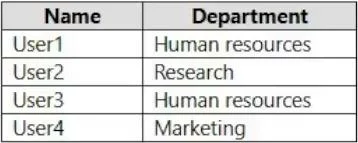
Options
- A1
- B2
- C3
- D4
- E5
How the community answered
(35 responses)- A3% (1)
- B6% (2)
- C77% (27)
- D11% (4)
- E3% (1)
Explanation
3 groups needed : - Group 1: Allusers (deploy EMS+S E5 licence and O365 E3 licence with "PowerAutomate for Office 365" disabled. - group 2: "Research group" : deploy Power Bi Pro Licence (not included in O365 E3 but in O365 - Group 3: "Marketing group" deploy Visio plan 2 Licence.
Topics
Community Discussion
No community discussion yet for this question.