
MB-920 · Question #170
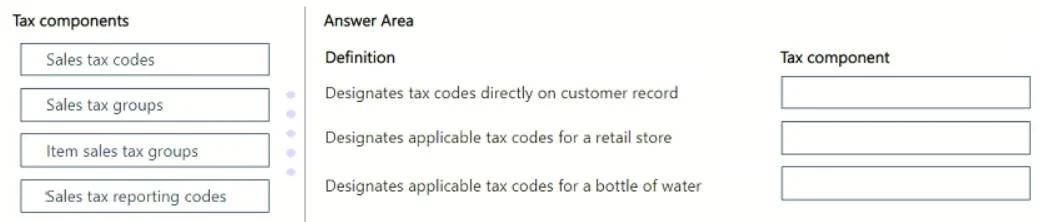
Drag and Drop Question A company uses finance and operations apps for its retail operations. The tax department of the company wants to know how sales taxes are calculated for items in a transaction…
This question tests knowledge of the three-component tax calculation framework in Microsoft Dynamics 365 Finance and Operations, where taxes are determined by the intersection of customer/vendor identity and item identity against defined tax rates.
Question
Exhibit
Explanation
This question tests knowledge of the three-component tax calculation framework in Microsoft Dynamics 365 Finance and Operations, where taxes are determined by the intersection of customer/vendor identity and item identity against defined tax rates.
Approach. In D365 Finance & Operations, sales tax calculation requires three cooperating components: (1) the Sales tax code holds the actual tax rate, calculation method (percentage, amount per unit, etc.), tax type, and settlement period - it is the atomic unit of a tax rule; (2) the Sales tax group is a container of sales tax codes attached to the buyer side - customers or vendors - so the system knows which taxes potentially apply based on who is purchasing; (3) the Item sales tax group is a container of sales tax codes attached to the sold item - products or services - so the system knows which taxes potentially apply based on what is being sold. At transaction time, D365 computes the intersection of the sales tax codes common to both the Sales tax group (customer) and the Item sales tax group (item); only codes present in both groups are actually applied and calculated. This design cleanly separates 'who is buying' from 'what is being bought,' allowing the same item to be taxed differently for different customers (e.g., exempt vs. taxable buyers) and the same customer to be taxed differently for different items (e.g., food vs. electronics).
Concept tested. Microsoft Dynamics 365 Finance & Operations - Sales Tax Calculation Architecture: the roles of Sales tax code, Sales tax group (customer/vendor side), and Item sales tax group (item/service side), and how their intersection drives which taxes are applied to a retail transaction.
Reference. Microsoft Learn - 'Set up sales tax' in Dynamics 365 Finance; MB-310 (Microsoft Dynamics 365 Finance Functional Consultant) exam domain: Configure and use basic budgeting and budget control / Configure tax components
Topics
Community Discussion
No community discussion yet for this question.