nerdexam
Microsoft

MB-800 · Question #190

Drag and Drop Question A company is replacing their current solution with Dynamics 365 Business Central. During the user acceptance testing, you identify several gaps in the solution. You must add…

The correct answer is Designer; Personalization. Dynamics 365 Business Central - Drag-and-Drop Explanation This question covers two distinct requirements, each solved by a different Business Central UI configuration tool. --- Requirement 1 → Designer Scenario: Add a new element (sales order count cue) to the role center so…

Perform Business Central operations

Question

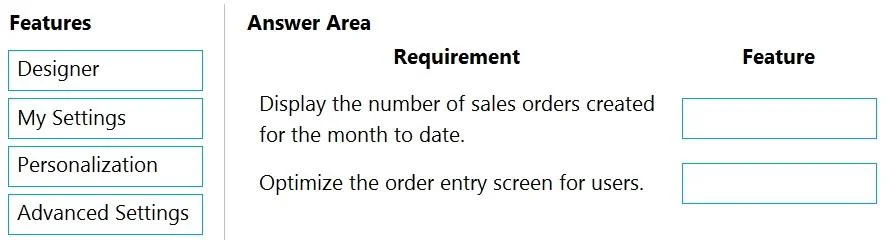
Drag and Drop Question A company is replacing their current solution with Dynamics 365 Business Central. During the user acceptance testing, you identify several gaps in the solution. You must add new functionality to the accounts receivable role center to allow order entry clerks to view the number of sales orders that they have created for the month to date. Clerks must be able to move the new role center element to another position on their interface. Accounts receivable clerks each have a specific order in which they enter sales order data. You must optimize the order entry process for these users. You need to configure the system. Which features should you use? To answer, drag the appropriate features to the correct requirements. Each feature may be used once, more than once, or not at all. You may need to drag the split bar between panes or scroll to view content. NOTE: Each correct selection is worth one point. Answer:

Exhibit
MB-800 question #190 exhibit

Answer Area

Drag items

DesignerMy SettingsPersonalizationAdvanced Settings

Correct arrangement

  • Designer
  • Personalization

Explanation

Dynamics 365 Business Central - Drag-and-Drop Explanation

This question covers two distinct requirements, each solved by a different Business Central UI configuration tool.


Requirement 1 → Designer

Scenario: Add a new element (sales order count cue) to the role center so clerks can see their month-to-date orders, and clerks must be able to reposition it.

Why Designer: Designer is the administrator-level tool used to make structural UI changes at the profile/role level, affecting all users assigned to that profile. It is the only tool capable of adding brand-new elements (like cues, KPIs, or actions) to a role center that don't already exist there. Changes made via Designer persist for all users in that role and cannot be accomplished through personalization alone.

Once an element exists on the role center (placed via Designer), individual users can then reposition it using Personalization - the requirement that clerks can move it is satisfied because Designer-placed elements are eligible for user-level repositioning.


Requirement 2 → Personalization

Scenario: Clerks follow a specific data entry order on the sales order page - optimize that workflow for each user individually.

Why Personalization: Personalization is a per-user tool that lets individuals (or admins on their behalf) rearrange fields, reorder FastTabs, show/hide columns, and adjust the layout of pages to match their preferred workflow. Since each clerk has their own specific entry sequence, Personalization is the right fit - it applies changes at the individual level without affecting other users.


Why the Other Options Are Wrong

OptionWhy Not
My SettingsControls basic preferences (language, timezone, role, company). Does not modify page layouts or add UI elements.
Advanced SettingsProvides access to system-level configuration but is not a UI personalization tool.

Common Misconceptions

  • "Personalization can add new role center elements" - It cannot. Personalization only rearranges or hides existing elements. Adding something new requires Designer.
  • "Designer is only for developers" - In Business Central, Designer is browser-accessible to administrators without writing code.
  • "One tool handles both requirements" - A common trap. Adding functionality = Designer (admin, profile-wide). Optimizing individual workflow = Personalization (user-level).

Topics

#role center#cue#personalization#field sequence

Community Discussion

No community discussion yet for this question.

Full MB-800 Practice