
MB-500 · Question #71
Drag and Drop Question You are a Dynamics 365 Finance developer. You need to troubleshoot performance issues for a client. Which Lifecycle Services (LCS) tools should you use for each environment?…
The correct answer is User Acceptance Testing (UAT) and Build; User Acceptance Testing (UAT) only; User Acceptance Testing (UAT) and Build. LCS Performance Tools - Environment Assignment > Note: The question as provided omits the tool names for positions 1, 2, and 3. Based on the answer pattern and standard Microsoft exam content, these almost certainly map to the three Monitoring & Diagnostics tools in LCS: |…
Question
Exhibit
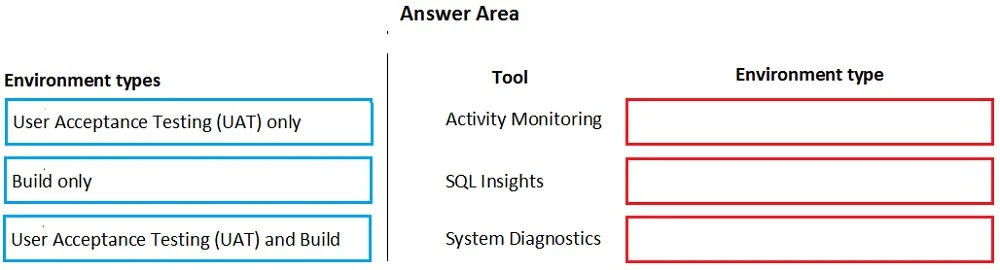
Answer Area
Drag items
Correct arrangement
- User Acceptance Testing (UAT) and Build
- User Acceptance Testing (UAT) only
- User Acceptance Testing (UAT) and Build
Explanation
LCS Performance Tools - Environment Assignment
Note: The question as provided omits the tool names for positions 1, 2, and 3. Based on the answer pattern and standard Microsoft exam content, these almost certainly map to the three Monitoring & Diagnostics tools in LCS:
| Position | Tool (inferred) | Correct Answer |
|---|---|---|
| 1 | Activity Monitoring | UAT and Build |
| 2 | SQL Insights | UAT only |
| 3 Environment Monitoring (Health metrics) | UAT and Build |
Why each placement is correct
Position 1 - UAT and Build Activity Monitoring captures user activity, batch jobs, and AOS-level telemetry. It is available on both Tier-2 (UAT/Sandbox) and Build environments because it relies on the environment's monitoring agent, which is deployed to both tiers. Production is excluded from the selectable items, so both UAT and Build qualify.
Position 2 - UAT only SQL Insights (Query Store–based diagnostics) requires direct access to the Azure SQL Database backing the environment. Build environments run on Tier-1 VMs with a local SQL Server instance and do not expose the same SQL telemetry surface that SQL Insights requires. Therefore SQL Insights is only available in UAT (Tier-2+) environments, not Build.
Position 3 - UAT and Build Environment Health / Monitoring diagnostics (performance counters, resource utilization) are available wherever the LCS monitoring agent is installed, which includes both UAT and Build environments - same reasoning as Position 1.
Common mistakes
- Assuming Build environments have no LCS tools - Build environments do support activity monitoring and health metrics; the limitation is specifically SQL Insights.
- Including Production - Production environments have restricted LCS tooling (you cannot freely run diagnostics); it doesn't appear as a valid option here for good reason.
- Conflating Tier 1 Dev with Build - A "Build" environment in LCS is a dedicated CI/CD agent box, not a personal developer VM. Both are Tier-1, but the exam specifically names "Build."
The core rule to remember: SQL Insights = UAT only (needs Tier-2 Azure SQL); all other LCS monitoring tools = UAT and Build.
Topics
Community Discussion
No community discussion yet for this question.