
MB-500 · Question #73
Drag and Drop Question You are a Dynamics 365 Finance developer for a company that sells pre-owned vehicles. When the company acquires a new vehicle, vehicle identification (VIN) numbers are added…
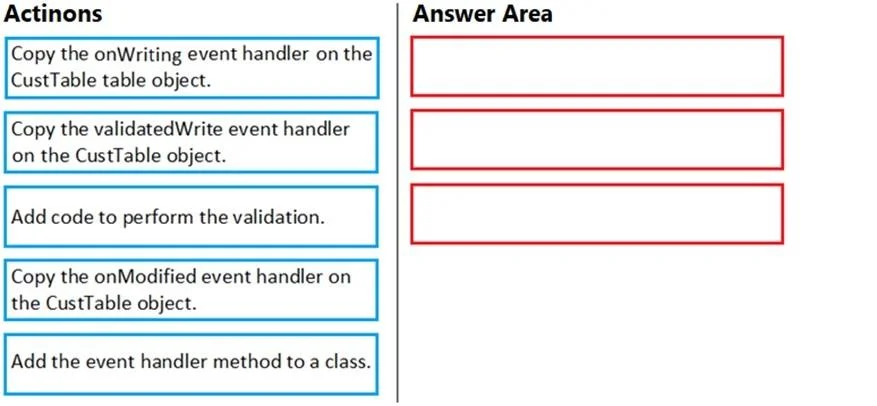
The correct answer is Copy the validatedWrite event handler on the CustTable object.; Add the event handler method to a class.; Add code to perform the validation. Explanation: D365 Finance VIN Validation Event Handler Core Concept In Dynamics 365 Finance, you never modify base objects directly. Instead, you use the event subscription model - copying event handler stubs and placing them in your own extension classes. The sequence reflects…
Question
Exhibit
Answer Area
Drag items
Correct arrangement
- Copy the validatedWrite event handler on the CustTable object.
- Add the event handler method to a class.
- Add code to perform the validation.
Explanation
Explanation: D365 Finance VIN Validation Event Handler
Core Concept
In Dynamics 365 Finance, you never modify base objects directly. Instead, you use the event subscription model - copying event handler stubs and placing them in your own extension classes. The sequence reflects this pattern.
Why This Sequence
Step 1: Copy the validatedWrite event handler on the CustTable object
validatedWrite is the correct event because:
- It fires when a record is about to be saved to the database
- It returns a
boolean- returningfalseblocks the save and displays an error to the user - It is the standard D365F validation hook for table-level record validation
In the AOT, you right-click the validatedWrite method on CustTable and select "Copy event handler method" - this gives you a correctly-typed delegate stub you can subscribe to without touching the base object.
Why not the distractors:
onWriting- fires during the write operation but is not designed to block saves with user-facing validation errors; it has no return value for validationonModified- fires when a field value changes in a form, not on save; this would fire on every keystroke, not at record commit
Step 2: Add the event handler method to a class
You paste the copied stub into a new X++ class (e.g., CustTableEventHandler). This class is your extension artifact - it owns the handler method and is where D365F's event subscription wiring points. You cannot register a free-floating function; it must live in a class.
Step 3: Add code to perform the validation
Only after the infrastructure exists (correct event, correct class) do you write the logic - checking strlen(custTable.VINField) >= 10, and calling checkFailed("VIN must be at least 10 characters") if it fails.
Common Mistakes
| Mistake | Why It's Wrong |
|---|---|
Choosing onWriting for validation | No return value; can't block the save |
Choosing onModified | Fires on field change, not record save |
| Writing code before adding to a class | The handler method has no home; it can't be registered |
| Modifying CustTable directly | Violates D365F's extension model; breaks on upgrades |
Summary
The sequence is event selection → infrastructure → logic - a pattern you'll repeat for any D365F event handler: pick the right hook, place it in an extension class, then implement the business rule.
Topics
Community Discussion
No community discussion yet for this question.