
MB-500 · Question #369
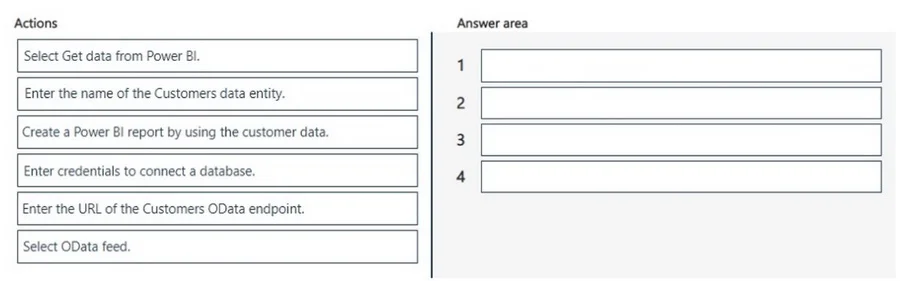
Drag and Drop Question A company uses Dynamics 365 finance and operations apps. The company uses Power BI Desktop to fetch a list of customers. You need to create a Power BI report to view the list…
The correct answer is Select Get data from Power BI.; Enter the URL of the Customers OData endpoint.; Enter credentials to connect a database.; Enter the name of the Customers data entity. Power BI + Dynamics 365 F&O: Sequence Explanation Context: Authentication is already complete. You need to pull the Customers data entity into Power BI Desktop. --- The Correct Sequence Step 1 - Select Get data from Power BI This is always the entry point for importing external…
Question
Exhibit
Answer Area
Drag items
Correct arrangement
- Select Get data from Power BI.
- Enter the URL of the Customers OData endpoint.
- Enter credentials to connect a database.
- Enter the name of the Customers data entity.
Explanation
Power BI + Dynamics 365 F&O: Sequence Explanation
Context: Authentication is already complete. You need to pull the Customers data entity into Power BI Desktop.
The Correct Sequence
Step 1 - Select Get data from Power BI
This is always the entry point for importing external data in Power BI Desktop. It opens the connector selection dialog. Nothing else can happen before this - it's the gateway to all data source configuration.
Step 2 - Enter the URL of the Customers OData endpoint
Dynamics 365 F&O exposes its data entities via OData REST endpoints (e.g., https://<environment>.cloudax.dynamics.com/data). After opening the data connector, you must specify where to connect before you can authenticate or select anything. URL comes before credentials - you can't authenticate against an unknown endpoint.
Step 3 - Enter credentials to connect a database
Even though D365 authentication was done at the app level, Power BI still needs credentials (typically Azure AD/OAuth) to establish its own session against the OData service. This happens after the URL is known and before you can browse available entities.
Step 4 - Enter the name of the Customers data entity
Once connected, D365 F&O exposes hundreds of entities. You specify the entity name (e.g., CustomersV3) to tell Power BI which dataset to load. This must be last in the connection setup sequence.
Why the Other Items Are Excluded
| Item | Why excluded |
|---|---|
| Select OData feed | The D365 F&O connector handles OData implicitly - selecting the D365 connector in "Get Data" already establishes this. Selecting a generic OData feed is a different (manual) path. |
| Create a Power BI report | This is the goal after all four steps complete - it's step 5, not part of the connection sequence. |
Common Mistakes
- Putting credentials before the URL - you cannot authenticate before specifying what you're connecting to; the endpoint must come first.
- Including "Select OData feed" - this feels logical but confuses the generic OData connector with the dedicated D365 F&O connector workflow.
- Putting the entity name before credentials - the connection must be authenticated before the service will expose its entity list for selection.
Topics
Community Discussion
No community discussion yet for this question.