Question
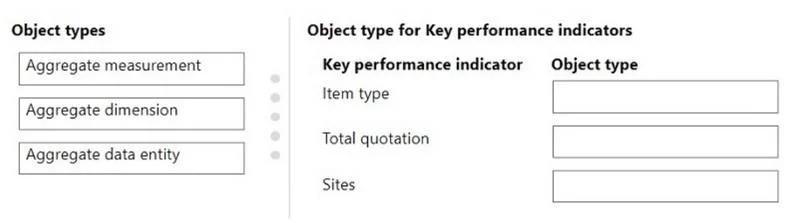
Case study 4 - ADatum Corporation Background ADatum Corporation is a market leader in the design and distribution of innovative aluminum systems. The company provides services to the architectural, residential, industrial, and home improvement markets in Australia. The company has warehouses in Perth. Sydney, and Melbourne. A team of warehouse employees provides delivery to the customer sites. Current Environment ADatum Corporation currently uses Microsoft Dynamics AX 2009. Customers use email or phone calls to place orders. After the company provides a quote to customers, the customer must agree to the sale price before the company places a sales order. The company is migrating to Dynamics 365 Finance and Dynamics 365 Supply Chain Management using a phased rollout strategy to its sites. The company has the Lifecycle services project to manage various environments and releases. The company has the following Finance and Supply Chain Management environments: - Development - Quality assurance (QA) - User acceptance testing (UAT) - Production The company uses Azure DevOps for a code repository. All developers use a development branch to check in code and a release branch to maintain the code for production releases. Requirements. General - Configure a cloud-based development environment for Finance and Supply Chain Management. Enable a code extension that supports updates. - Configure Microsoft-supported version control and an Azure-hosted build pipeline. - Migrate all document handling attachments for the customers to Finance and Supply Chain Management from Dynamics AX 2009. - Audit X++ code for a best practice check. - All new code must be unit tested in a development environment and then validated by the QA team before the code is merged into the Release branch for further releases. Requirements. Business processes - All changes that are deployed to the UAT environment must be approved for code release to production. - The sales manager requires a solution that is extensible to ensure that new master tables document handling attachments are migrated to the new system. - A base class named MigrateAttachment must be designed with methods that all child classes must implement. - A method named processAttachment must be created so that extenders are not able to subscribe to pre-events and post-events. - On the All sales orders list page, two new fields must be added for the total sales order amount. One field uses goods and services tax (GST) and the other field does not use GST. - A process named Populate check data must be designed based on the following: The process must run from the All customers list page and populate a custom table named CustCheckData with 1000 rows. The table must have two fields named CheckNumber and BankNumber. The process must return to the current session after the data is processed. - The generated check data must be available for users to access in a tabular form without additional details and preview panes. - The purchase manager requires a new data entity to send out the information for purchase order inquiries that are generated in Finance and Supply Chain Management - The sales manager must be able to access the total quotation for the sites and item types. - The sales manager requires a quotation number to be printed on the sales invoice business document. Customers must be able to access the reference number on the invoice documents. - The purchase manager requires a new approval workflow for approving purchase orders that are more than $10,000. Requirements. Business systems - After a user named UserA posts a packing slip for a sales order, customers must be informed of the product delivery in real-time. This information is provided using business events. - Purchase order inquiries must be exported from the Finance and Supply Chain Management using data packages. Users must be able to query using OData but should not be able to update or create the data in the system. - A sales manager's workspace must display the total quotations using key performance indicators. - The purchase order approval workflow must be configured from the procurement and sourcing module. Issues - UserA reports delays when opening the All sales orders list page. - A customer is unable to access the business events for a packing slip that is posted by UserA. - A user named UserB reports that the system is unresponsive when they run the Populate check data process for a customer. - UserA reports that the print management settings in the accounts receivable module do not display the new layout when testing a new sales invoice report layout in the UAT environment. Drag and Drop Question You need to design the workspace for the sales manager. Which object types should you use? To answer, move the appropriate object types to the correct key performance indicators. You may use each object type once, more than once, or not at all. You may need to move the split bar between panes or scroll to view content. NOTE: Each correct selection is worth one point. Answer:
Explanation
Dynamics 365 F&SCM Workspace KPI Design
Context
The sales manager's workspace must display total quotations by sites and item types as KPIs. In D365 Finance and Supply Chain Management, workspace KPIs are built using the embedded analytics framework (deployed to SSAS/Azure Analysis Services). Three distinct object types serve distinct roles in that pipeline.
Why This Arrangement
1. Aggregate Dimension
Role: Defines the dimensional model - the categorical attributes used to slice and filter data.
For this scenario, "sites" and "item types" are dimensions. An Aggregate Dimension object maps to a backing table (e.g., InventSite, InventItemGroup) and exposes its attributes for use in measurements. You define dimensions first because the measurement layer depends on them.
Common mistake: Confusing an Aggregate Dimension with a regular table or view. It is specifically a metadata object registered in the analytics framework, not just a table reference.
2. Aggregate Measurement
Role: Defines the star schema / cube - the measures (facts) plus references to dimensions.
This is the central construct. It holds numeric measures like SUM(QuotationAmount) and references the Aggregate Dimension objects defined above. Workspace KPI tiles directly bind to an Aggregate Measurement to render values. This is roughly equivalent to an SSAS cube or Power BI dataset model.
Common mistake: Thinking Aggregate Measurement alone is sufficient without dimensions. Without dimensions, you can't slice the total quotation by site or item type.
3. Aggregate Data Entity
Role: Exposes aggregated/pre-computed data as a queryable entity layer for the workspace and external consumers.
Once the measurement is defined, the Aggregate Data Entity wraps it in an entity format, making the summarized data accessible in tabular form - both for workspace tiles and for OData querying. This is also what enables the read-only OData requirement stated in the case study.
Common mistake: Using a standard Data Entity here instead of an Aggregate Data Entity. A standard entity reads raw transactional data, not pre-aggregated analytical data, which would cause performance issues and incorrect KPI rollups.
Summary Table
| Position | Object Type | Purpose |
|---|
| 1 | Aggregate Dimension | Defines Sites / Item Types as dimensional attributes |
| 2 | Aggregate Measurement | Defines the total quotation measure, references dimensions |
| 3 | Aggregate Data Entity | Exposes aggregated data to the workspace KPI and OData |
The order reflects a dependency chain: dimensions must exist before a measurement can reference them, and the data entity wraps the measurement for consumption. Skipping or reordering breaks the pipeline.