MB-335 · Question #174
Drag and Drop Question A company is implementing Dynamics 365 Supply Chain Management. The company is a subcontractor that produces subassemblies for two major customers, CustomerA and CustomerB. The
The correct answer is Production pool; Route group. Drag-and-Drop Explanation: D365 SCM Production Configuration The Two Requirements Being Matched The scenario has two distinct configuration needs: | # | Requirement | Correct Configuration | |---|-------------|----------------------| | 1 | Schedule CustomerA orders to start on Mo
Question
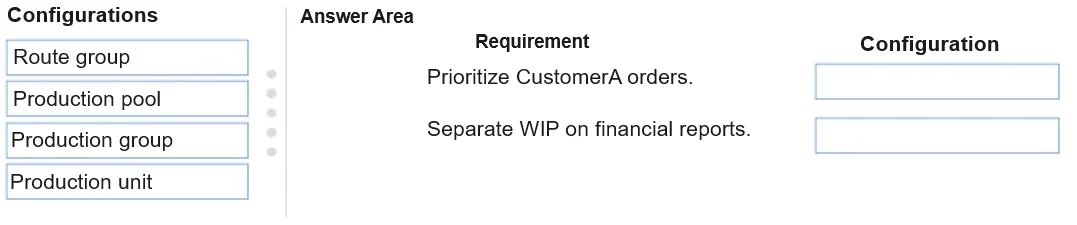
Drag and Drop Question A company is implementing Dynamics 365 Supply Chain Management. The company is a subcontractor that produces subassemblies for two major customers, CustomerA and CustomerB. The company prioritizes CustomerA production orders to start on Mondays. The production orders may take several days to complete. CustomerB orders are produced throughout the week, after CustomerA orders are completed. Work in process (WIP) must be calculated and consolidated for CustomerA and CustomerB respectively on the financial reports. You need to configure the production requirements. What should you configure? To answer, drag the appropriate configurations to the correct requirements. Each configuration may be used once, more than once, or not at all. You may need to drag the split bar between panes or scroll to view content. NOTE: Each correct selection is worth one point. Answer:
Exhibit
Answer Area
Drag items
Correct arrangement
- Production pool
- Route group
Explanation
Drag-and-Drop Explanation: D365 SCM Production Configuration
The Two Requirements Being Matched
The scenario has two distinct configuration needs:
| # | Requirement | Correct Configuration |
|---|---|---|
| 1 | Schedule CustomerA orders to start on Mondays (prioritization) | Production pool |
| 2 | Calculate and consolidate WIP for each customer on financial reports | Route group |
Placement 1: Production Pool (Scheduling/Priority)
Production pools group production orders for scheduling and planning purposes. In D365 SCM, a pool can be assigned to CustomerA orders specifically, allowing the scheduler to prioritize that pool's orders to begin on Mondays.
- Controls when production orders are scheduled and their relative priority
- Allows planners to apply scheduling rules (e.g., "start of week") to a defined group of orders
- CustomerA gets its own pool; CustomerB gets another - enabling independent scheduling behavior
Placement 2: Route Group (WIP Calculation)
Route groups are attached to route operations and contain a "Post WIP" setting. This controls whether Work in Process is financially posted when route card or job card journals are updated during production.
- WIP is an intermediate financial posting that occurs during production, not at completion
- By configuring route groups with WIP posting enabled, the system generates ledger entries as operations progress
- Since CustomerA and CustomerB orders are linked to their respective production orders (and thus routes), WIP consolidates separately per customer on financial reports
Common Mistakes
| Wrong Choice | Why People Pick It | Why It's Wrong |
|---|---|---|
| Production group | Also links to ledger accounts | Handles final cost postings (materials, finished goods) - not intermediate WIP during operations |
| Production unit | Sounds like an organizational grouping | Used to group work centers/resources physically - has no scheduling priority or WIP posting functionality |
| Route group for scheduling | Routes are tied to production timing | Route groups control how operations are costed/posted, not when orders are prioritized to run |
Key Distinction to Remember
Production pool = scheduling priority and grouping
Route group = WIP and cost posting behavior during operations
These two work at different layers: pools operate at the order level (when to run), route groups operate at the operation level (how costs flow through the ledger).
Topics
Community Discussion
No community discussion yet for this question.
