
MB-330 · Question #60
Drag and Drop Question A manufacturing company is setting up a new warehouse. The warehouse must store a product that is currently stored in another warehouse. You need to create new item coverage…
Item Coverage Setup for a New Warehouse - Explanation This question is from Microsoft Dynamics 365 Supply Chain Management, covering the Master Planning > Item Coverage configuration workflow. The goal is to tell the planning engine: "For this new warehouse, replenish stock by…
Question
Exhibit
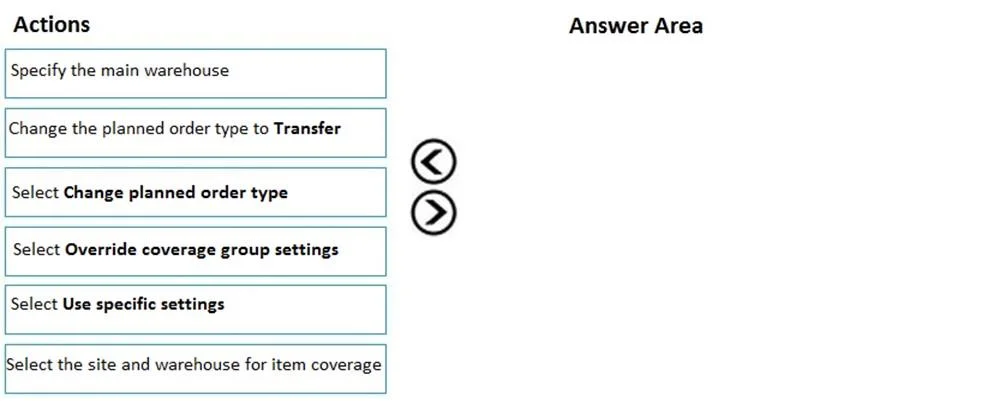
Options
- Box1Select the site and warehouse for item coverage
- Box2Select Change planned order type
- Box3Change the planned order type to Transfer
- Box4Specify the main warehouse
Explanation
Item Coverage Setup for a New Warehouse - Explanation
This question is from Microsoft Dynamics 365 Supply Chain Management, covering the Master Planning > Item Coverage configuration workflow. The goal is to tell the planning engine: "For this new warehouse, replenish stock by transferring from the main warehouse - don't manufacture or purchase."
Why This Sequence?
The logic follows a strict dependency chain: you can't configure what until you've established where, and you can't specify a source until you've told the system what type of replenishment to use.
Step-by-Step Breakdown
Box 1 - Select the site and warehouse for item coverage
This must come first because it defines the scope of the coverage rule. Item coverage in D365 is always tied to a specific site/warehouse combination. Without establishing this context, none of the subsequent settings have a target to attach to. You're essentially opening a new coverage record for the new warehouse.
Box 2 - Select "Change planned order type"
Once the coverage record exists for the correct warehouse, you enable the override of the planned order type. By default, the system may plan replenishment via Purchase or Production. You must explicitly activate the planned order type field before you can change its value - this is a UI toggle in the item coverage form that unlocks the dropdown.
Box 3 - Change the planned order type to Transfer
Now that the field is unlocked, you set it to Transfer. This instructs Master Planning to generate transfer orders (not purchase orders or production orders) when the new warehouse runs low. This step must come after Box 2 because the dropdown is inactive until you've selected "Change planned order type."
Box 4 - Specify the main warehouse
Only after selecting Transfer as the replenishment method does the "From warehouse" (main warehouse) field become relevant and available. This tells the system where to transfer from. Setting this last is correct because it's a child configuration of the Transfer type - it has no meaning if the type isn't Transfer.
Common Mistakes
| Mistake | Why It's Wrong |
|---|---|
| Specifying the main warehouse before setting the type to Transfer | The source warehouse field is irrelevant/unavailable until Transfer is selected |
| Skipping Box 2 and jumping straight to changing the type | The planned order type field is read-only until "Change planned order type" is explicitly toggled |
| Selecting the wrong site/warehouse first | Coverage rules are site/warehouse-scoped - wrong scope means the rule applies to the wrong location |
| Confusing "main warehouse" with the new warehouse | The main warehouse is the source (existing stock); the new warehouse was already set in Box 1 |
Summary
The sequence enforces a configure context → unlock field → set value → set dependency pattern, which is typical of D365 SCM's item coverage form design. Each step is a prerequisite for the next.
Topics
Community Discussion
No community discussion yet for this question.