
MB-330 · Question #468
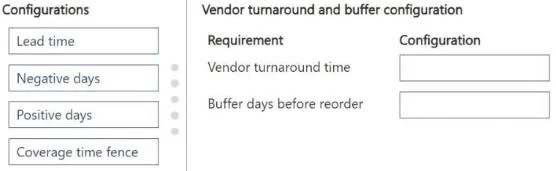
Drag and Drop Question A company uses Dynamics 365 Supply Chain Management. A planner observes that an item has last-minute orders placed. These orders drive new demand that is dependent upon POs…
The correct answer is Lead time; Positive days. Explanation: Dynamics 365 SCM Vendor Turnaround & Reorder Buffer The question presents two distinct requirements and asks you to match the correct configuration to each. --- Requirement 1: Adjust for vendor inconsistency with turnaround time Correct Configuration: Lead Time…
Question
Exhibit
Answer Area
Drag items
Correct arrangement
- Lead time
- Positive days
Explanation
Explanation: Dynamics 365 SCM Vendor Turnaround & Reorder Buffer
The question presents two distinct requirements and asks you to match the correct configuration to each.
Requirement 1: Adjust for vendor inconsistency with turnaround time
Correct Configuration: Lead Time
Why: Lead time is the number of days the system expects a vendor to take from purchase order placement to delivery. When a vendor is inconsistent, you increase the lead time value to a conservative estimate that accounts for their typical delays. Master Planning uses lead time to calculate when to place a planned purchase order, working backward from the demand date. A longer lead time tells the system to order earlier, buffering against the vendor's unreliability.
Key point: This is configured on the item's coverage settings, item default order settings, or directly on the vendor/item combination.
Requirement 2: Add a buffer of two days prior to reordering
Correct Configuration: Positive Days
Why: Positive days (in a coverage group) defines how many days forward the planning engine looks for existing supply before generating a new planned order. Setting this to 2 means the system will check whether any existing receipts arriving within the next 2 days can cover new demand - if so, no new order is triggered. This acts as a reorder buffer, preventing premature or unnecessary planned orders.
Key point: This reduces "nervous" planning by giving existing supply a 2-day window to be reused before a new order fires.
Common Mistakes & Misconceptions
| Misconception | Reality |
|---|---|
| Using Negative days for the buffer | Negative days looks backward - it allows a late-arriving receipt to cover past-due demand. It doesn't add a forward buffer before reordering. |
| Using Coverage time fence | This defines the planning horizon (how far out MRP looks), not a reorder buffer or lead time adjustment. |
| Confusing lead time with positive days | Lead time = how long delivery takes; Positive days = tolerance window before generating a new order. They solve different problems. |
Summary
| Requirement | Configuration |
|---|---|
| Vendor inconsistent with turnaround time | Lead Time |
| Buffer of 2 days before reordering | Positive Days |
Topics
Community Discussion
No community discussion yet for this question.