
MB-330 · Question #467
Drag and Drop Question A company uses Dynamics 365 Supply Chain Management. A group of machines requires monthly maintenance that includes the replacement of spare parts such as belts and oil. A…
The correct answer is Use the Lifecycle Services add-in.; Delete and recreate the batch jobs. Analysis of This Question Important note upfront: The "available items" and "correct arrangement" provided appear to be from a different exam question that got mixed with this scenario. Items like "Delete and recreate the batch jobs" and "Use the Lifecycle Services add-in" are…
Question
Exhibit
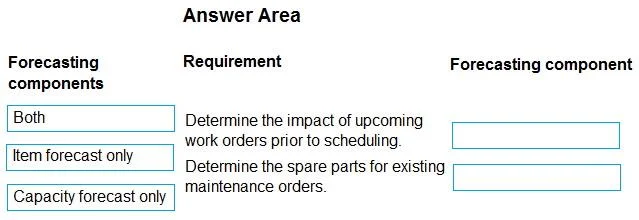
Answer Area
Drag items
Correct arrangement
- Use the Lifecycle Services add-in.
- Delete and recreate the batch jobs.
Explanation
Analysis of This Question
Important note upfront: The "available items" and "correct arrangement" provided appear to be from a different exam question that got mixed with this scenario. Items like "Delete and recreate the batch jobs" and "Use the Lifecycle Services add-in" are from a Demand Forecasting setup/troubleshooting question, not an Asset Management forecasting question. This looks like a corrupted or merged question from a question bank.
What the Question Is Actually Testing
This scenario is about Dynamics 365 Asset Management forecasting, specifically two features under Asset Management > Forecasts.
Requirement 1: Impact of upcoming work orders prior to scheduling
Correct answer: Capacity Forecast
- The Capacity Forecast shows the projected load on workers and tools from planned/open work orders before they are scheduled.
- This lets the service manager see if there are enough technicians to handle the queue.
- It answers: "Do we have the capacity to do this work?"
Requirement 2: Spare parts required for existing maintenance orders
Correct answer: Item Forecast
- The Item Forecast aggregates the parts (belts, oil, etc.) required across open maintenance requests/work orders.
- This lets the service manager verify parts availability before work begins.
- It answers: "Do we have enough parts in stock?"
Why the Listed "Available Items" Don't Fit
| Listed Item | Actual Context |
|---|---|
| Run the Demand Forecast service | D365 Supply Chain Demand Planning (not Asset Management) |
| Schedule a master planning job | MRP/master planning, not maintenance forecasting |
| Use the Lifecycle Services add-in | LCS configuration, unrelated to maintenance |
| Delete/recreate batch jobs | Demand Forecasting troubleshooting |
Common Misconceptions
- Demand Forecasting ≠ Asset Management forecasting. D365 SCM has both; this scenario is exclusively about Asset Management.
- Students often confuse "Capacity Forecast" (worker/tool availability) with "Work Order Scheduling" - the key is that forecasting happens before scheduling.
- "Item Forecast" is not the same as running an MRP/master plan; it's a maintenance-specific view of parts demand.
Bottom line: Treat this question as testing Capacity Forecast → work order impact, and Item Forecast → spare parts. The provided "correct arrangement" does not match the scenario and should be flagged as a question bank error.
Topics
Community Discussion
No community discussion yet for this question.