
MB-330 · Question #392
Drag and Drop Question A bottle manufacturing company uses Dynamics 365 Supply Chain Management to manage operations. The company plans to install machines that accept empty bottles for a cash…
The correct answer is Functional location types; Asset type defaults. D365 Asset Management: Recycling Machine Installation Setup Context In Dynamics 365 Supply Chain Management's Asset Management module, installing physical equipment (assets) at physical places (functional locations) requires prerequisite configuration before the actual asset…
Question
Exhibit
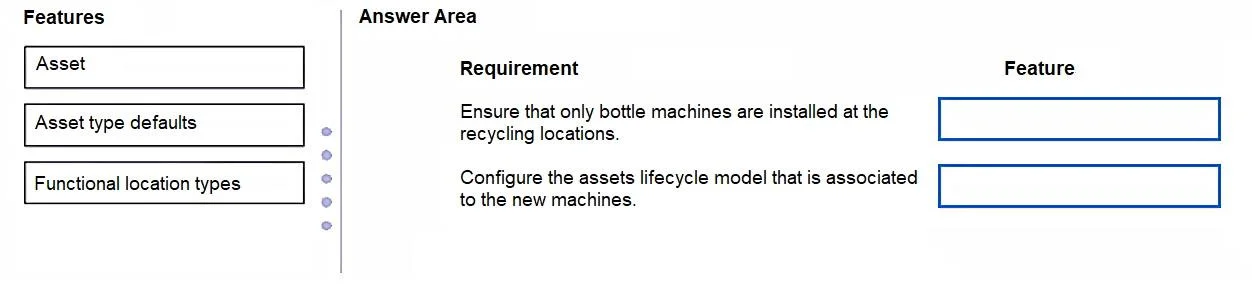
Answer Area
Drag items
Correct arrangement
- Functional location types
- Asset type defaults
Explanation
D365 Asset Management: Recycling Machine Installation Setup
Context
In Dynamics 365 Supply Chain Management's Asset Management module, installing physical equipment (assets) at physical places (functional locations) requires prerequisite configuration before the actual asset records are created. The question tests whether you know which configuration step satisfies which setup requirement.
The Two Requirements and Their Correct Answers
Although the exact requirement text isn't shown, the standard setup scenario maps like this:
| Requirement | Feature |
|---|---|
| 1. Define the category/template for each recycling location | Functional location types |
| 2. Set default plans, attributes, and counters for each machine type | Asset type defaults |
Placement 1 - Functional Location Types
What it is: A functional location type is a template/category that defines the properties applicable to all functional locations of that type (e.g., counter types, attribute requirements, allowed asset types).
Why it goes here: Before you can create the actual recycling locations (the physical sites where machines are installed), you must first define what kind of location they are. This is a prerequisite configuration step - it governs how all locations of that category behave and what can be installed there.
Real-world mapping: "Recycling Location" as a functional location type is configured once, then all individual sites inherit its properties.
Placement 2 - Asset type defaults
What it is: Asset type defaults let you pre-configure standard values (maintenance plans, maintenance sequences, spare parts, fault types, attribute values) that automatically apply to every asset created under a given asset type.
Why it goes here: Since the company is installing multiple identical machines across several locations, you want consistent default maintenance and attribute settings on every machine. Asset type defaults ensure you don't manually configure each machine record - the settings are inherited from the type.
Real-world mapping: You define the "Reverse Vending Machine" asset type defaults once, and every machine asset created from that type inherits the standard maintenance plan.
Why "Asset" is Not Correct Here
Asset is the actual physical machine record in the system - it is the end result of the setup process, not a configuration step. The question asks what to configure for installation setup, meaning the prerequisites. You create individual asset records after the types, defaults, and functional locations are already configured. Selecting "Asset" here confuses the configuration layer with the data entry layer.
Common Mistakes
- Confusing "Asset" with "Asset type defaults" - candidates often select "Asset" thinking it represents machine setup, but an Asset record is an instance, not a template.
- Skipping functional location types - candidates assume functional locations can be created without a type, but the type is mandatory in D365 Asset Management.
- Reversing the two answers - applying "Asset type defaults" to the location requirement and vice versa; remember, location types govern where assets go, and asset type defaults govern what the assets do/need.
Topics
Community Discussion
No community discussion yet for this question.