
MB-330 · Question #470
Drag and Drop Question A company uses Dynamics 365 Supply Chain Management. The sales team reports that sales orders were not delivered on schedule, but inventory is on- hand. A planner identifies…
The correct answer is Coverage group; Item coverage. Explanation: Master Planning Configuration in D365 SCM Understanding the Two Scenarios | Scenario | Problem | Root Cause | |---|---|---| | Sales Order 1 | Inventory pegged to a later order instead of the urgent one | Pegging/allocation priority misconfigured at the group level…
Question
Exhibit
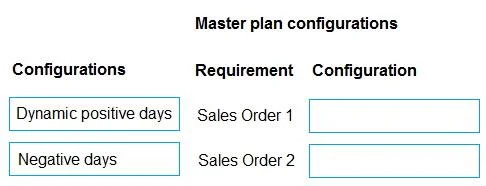
Answer Area
Drag items
Correct arrangement
- Coverage group
- Item coverage
Explanation
Explanation: Master Planning Configuration in D365 SCM
Understanding the Two Scenarios
| Scenario | Problem | Root Cause |
|---|---|---|
| Sales Order 1 | Inventory pegged to a later order instead of the urgent one | Pegging/allocation priority misconfigured at the group level |
| Sales Order 2 | Inventory pegged to a late PO; action message to cancel & reorder fired | Supply replenishment behavior needs an item-level override |
Placement 1: Coverage Group → Scenario 1 (Last-minute order, inventory pegged to later date)
Why Coverage Group?
The Coverage group holds the negative days setting, which is the key lever here.
- Negative days controls how many days past a requirement date the system will still consider existing supply valid, rather than creating a new planned order.
- When a last-minute sales order arrives and inventory is already soft-pegged to a later delivery date, the negative days value determines whether the planning engine will re-allocate that inventory to the more urgent demand.
- Setting negative days correctly forces the engine to respect demand urgency and re-peg inventory to the earliest due date first.
- Coverage groups apply across all items in that group, making this the right level for a systemic pegging-priority fix.
Common mistake: Planners often try to fix this in the Master plan settings. Master plan controls global on/off toggles (action messages, futures messages, freeze fence) - it doesn't govern how supply gets matched to specific demands at the item/group level.
Placement 2: Item Coverage → Scenario 2 (Inventory pegged to late PO, cancel/reorder triggered)
Why Item Coverage?
The Item coverage record is an item-level override of the coverage group defaults.
- In Scenario 2, the late PO already triggered the correct action message (cancel and reorder), meaning the planning engine's action message logic is working. The problem is that this item has a specific replenishment behavior (e.g., a consistently unreliable lead time) that needs to be handled differently than the rest of the coverage group.
- Item coverage lets you override negative days, positive days, coverage code, and lead times for a single item/site/warehouse combination - without changing behavior for other items sharing the same coverage group.
- This is the precision tool: you apply it when one item's supply pattern is anomalous and needs its own rules.
Common mistake: Choosing Coverage group for Scenario 2 would change behavior for every item in that group, which is too broad. Item coverage surgically fixes the problem for just the affected item.
Why "Master Plan" Is Not Used Here
The Master plan is a valid configuration object, but it operates at the run level - it controls whether action messages and futures are generated at all, the planning horizon, and static vs. dynamic plan behavior. Neither scenario requires changing the plan's global behavior; both require tuning how the engine pegs supply to demand, which lives in Coverage group and Item coverage.
Summary
Scenario 1 (pegging priority for urgent orders)  →  Coverage Group  (negative days, group-wide)
Scenario 2 (item-specific late PO handling)       →  Item Coverage   (per-item override)
Master Plan                                        →  Not needed here (global toggles, not pegging logic)
Topics
Community Discussion
No community discussion yet for this question.