
MB-330 · Question #471
Drag and Drop Question A distribution company uses Dynamics 365 Supply Chain Management, The materials manager reports that purchase orders for a group of items are often placed too late to full…
The correct answer is Dynamic positive days; Negative days. Dynamics 365 SCM Master Planning - Drag-and-Drop Explanation Context The scenario has two core requirements: 1. Prevent late purchase orders caused by long lead times 2. Allow mass updates to avoid extra configuration work per item --- Placement 1: Dynamic Positive Days → Long…
Question
Exhibit
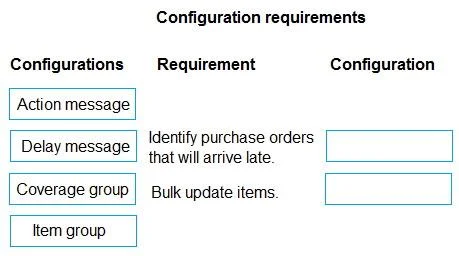
Answer Area
Drag items
Correct arrangement
- Dynamic positive days
- Negative days
Explanation
Dynamics 365 SCM Master Planning - Drag-and-Drop Explanation
Context
The scenario has two core requirements:
- Prevent late purchase orders caused by long lead times
- Allow mass updates to avoid extra configuration work per item
Placement 1: Dynamic Positive Days → Long Lead Time Problem
What it does: Dynamic positive days tells master planning to automatically calculate the positive days window based on each item's lead time. Instead of a fixed look-ahead window, the formula becomes:
Effective positive days = Item lead time + configured positive days buffer
Why it fits here: For items with long lead times, the system needs to look further into the future to match demand with existing or planned supply. Without dynamic positive days, master planning may not "see" that a future demand can be satisfied by an existing PO placed early enough, and will incorrectly trigger a new - and redundant - planned order. Enabling this ensures the planning window scales with lead time automatically.
Mass update angle: Dynamic positive days is configured at the coverage group level, so one change applies across all items in that group - satisfying the mass update requirement.
Placement 2: Negative Days → Reduce Unnecessary Planned Orders
What it does: Negative days defines how many days past a requirement date an existing supply order is allowed to be late before master planning abandons it and creates a new planned order.
If negative days = 7 and an existing PO arrives 5 days late → master planning reuses it, no new order created.
Why it fits here: Without adequate negative days, master planning generates new planned purchase orders for every slightly-delayed supply, burying the team in noise. Setting this value appropriately reduces that churn - directly addressing "avoid creating additional work."
Mass update angle: Also configured at the coverage group level, enabling a single update to affect all linked items at once.
Common Misconceptions
| Misconception | Reality |
|---|---|
| "Positive days = negative days, just in different directions" | They serve distinct purposes: positive days controls future supply matching; negative days controls tolerance for late supply |
| "Negative days should always be set high to reduce work" | Too high and master planning ignores genuinely problematic delays, masking real supply issues |
| "Dynamic positive days is just a toggle for automatic calculation" | It fundamentally changes how the planning engine scopes supply coverage per item, not just a convenience setting |
| "These settings must be configured per item" | Both live on the coverage group, enabling the mass update the manager requires |
Summary
- Dynamic positive days solves the lead-time mismatch by expanding the planning horizon proportionally per item.
- Negative days reduces workload by tolerating minor supply delays without generating new planned orders.
- Both are coverage-group-level settings, satisfying the mass update requirement.
Topics
Community Discussion
No community discussion yet for this question.