
MB-330 · Question #184
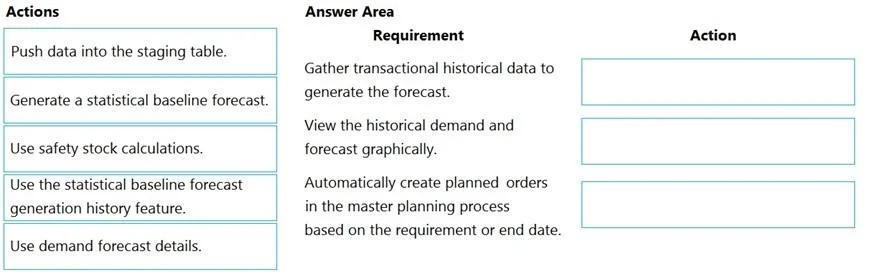
Drag and Drop Question A company implements Dynamics 365 Supply Chain Management. The company needs to improve the reliability of their forecasting data. You need to implement demand forecasting to…
The correct answer is Push data into the staging table.; Use demand forecast details.; Generate a statistical baseline forecast. Demand Forecasting in D365 Supply Chain Management - Explained This question maps three requirements to the correct actions in the demand forecasting workflow. The underlying process follows a prepare → review → generate pattern for improving forecast reliability. --- Why This…
Question
Exhibit
Answer Area
Drag items
Correct arrangement
- Push data into the staging table.
- Use demand forecast details.
- Generate a statistical baseline forecast.
Explanation
Demand Forecasting in D365 Supply Chain Management - Explained
This question maps three requirements to the correct actions in the demand forecasting workflow. The underlying process follows a prepare → review → generate pattern for improving forecast reliability.
Why This Arrangement
1. Push data into the staging table
Why first: Before any forecast can run, historical transaction data must be pushed into D365's demand forecast staging tables. Azure Machine Learning - which powers D365's statistical forecasting - reads from these staging tables, not directly from transactional records. If the staging data is missing, stale, or incorrect, every downstream forecast will be unreliable. This is the foundational data-prep step.
Reliability angle: The question emphasizes improving reliability. Ensuring clean, complete data in staging is the single biggest lever for that.
2. Use demand forecast details
Why second: The "Demand forecast details" page lets planners view, adjust, and validate individual forecast lines - including reviewing the underlying demand signals. This acts as a quality control step: you inspect what data is in play and make any manual corrections before committing to a new statistical run.
Note: This can also be used post-generation to adjust forecast quantities manually, but in an improvement workflow, reviewing details before regenerating prevents running a bad forecast twice.
3. Generate a statistical baseline forecast
Why third: Once data is staged and validated, you trigger the statistical baseline forecast generation. This sends the staged historical demand to Azure ML, which applies time-series algorithms and returns forecast values back into D365. This is the actual forecast creation step.
Why the Other Items Are Excluded
| Item | Why not used |
|---|---|
| Use safety stock calculations | Safety stock is a replenishment buffer tool, not a forecasting tool. It doesn't improve forecast reliability. |
| Use the statistical baseline forecast generation history feature | This is an audit/troubleshooting tool for reviewing past forecast runs - useful diagnostically, but not part of the implementation workflow for improving reliability. |
Common Misconceptions
- "Generate the forecast first, then push data" - Wrong order. You cannot generate a meaningful statistical forecast without staged historical data. Data prep always precedes generation.
- "Safety stock improves forecast reliability" - Safety stock compensates for forecast uncertainty; it doesn't improve the forecast itself.
- "Demand forecast details = forecast history" - These are different features. Details shows individual forecast lines (editable); history shows past generation runs (read-only audit trail).
Topics
Community Discussion
No community discussion yet for this question.