
MB-330 · Question #182
Drag and Drop Question A company uses Dynamics 365 Supply Chain Management. The company needs to maintain item bar codes. You need to set up bar codes for the items. Which option should you use for…
The correct answer is Create/Update bar codes; Create bar codes from number sequence; Scanning. Dynamics 365 SCM Bar Code Setup - Exam Explanation > Note: The question as presented is missing the explicit requirement descriptions (what each numbered slot is asking for). Based on the correct arrangement and standard D365 SCM bar code functionality, here is what each…
Question
Exhibit
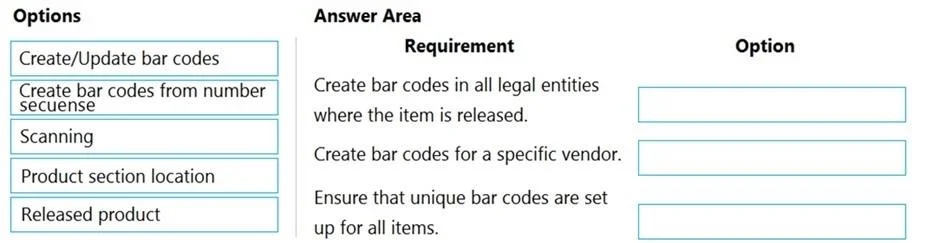
Answer Area
Drag items
Correct arrangement
- Create/Update bar codes
- Create bar codes from number sequence
- Scanning
Explanation
Dynamics 365 SCM Bar Code Setup - Exam Explanation
Note: The question as presented is missing the explicit requirement descriptions (what each numbered slot is asking for). Based on the correct arrangement and standard D365 SCM bar code functionality, here is what each placement means and why.
Context: Where Bar Codes Live in D365 SCM
Bar code setup is found under Inventory Management > Setup > Bar codes. The toolbar/ribbon on that form exposes several actions, which is exactly what this question tests.
Placement 1: Create/Update bar codes
What it does: Manually creates a new bar code record or modifies an existing one for a specific item. You specify the item number, unit of measure, quantity, and the bar code value directly.
Why it's correct here: When the requirement is to manually define or change a bar code for a specific item (e.g., a vendor changes their packaging and you need to update the EAN/UPC), this is the right tool. It gives you direct, record-level control.
Common mistake: Confusing this with the Released product form. While you can view bar codes from the released product record, the Create/Update action on the bar codes form is the correct setup location.
Placement 2: Create bar codes from number sequence
What it does: Automatically generates bar codes in bulk for multiple items using a pre-configured number sequence. D365 assigns the next number in the sequence as the bar code value.
Why it's correct here: When the requirement is to generate bar codes systematically and at scale (e.g., onboarding hundreds of new SKUs), manual entry is impractical. The number sequence method ensures uniqueness and consistency without manual input.
Common mistake: Thinking this is only for GS1/EAN formats. It works with any internal number sequence you configure in Organization Administration > Number sequences.
Placement 3: Scanning
What it does: Allows you to validate or look up a bar code by scanning it - effectively testing that a bar code is correctly registered in the system and resolves to the right item.
Why it's correct here: After bar codes are created, you need to confirm they work. The Scanning option simulates reading the bar code and shows what item/unit it resolves to. This is a verification/operational step, not a creation step.
Common mistake: Treating Scanning as a data-entry or setup tool. It does not create bar codes - it only reads/validates them.
Why the Unused Options Are Wrong
| Option | Why Not Used |
|---|---|
| Product section location | Not a standard bar code setup action in D365 SCM. This is a distractor. |
| Released product | The released product form displays associated bar codes but is not the setup mechanism. You navigate from there but set up bar codes in the bar codes form. |
Key Takeaway
The three correct options map to a logical workflow:
- Create/Update → one-off manual creation
- Number sequence → bulk automated creation
- Scanning → verification/operational use
This mirrors a real implementation pattern: create codes manually for exceptions, generate them in bulk for large catalogs, then scan to confirm.
Topics
Community Discussion
No community discussion yet for this question.