
MB-330 · Question #57
Drag and Drop Question A company plans to use warehouse management and dock appointment scheduling in Dynamics 365 Supply Chain Management. You need to configure the system. Which configuration…
The correct answer is location profile ID; location profile ID; appointment rule; appointment scheduling. Dynamics 365 SCM: Warehouse & Dock Appointment Configuration > Note: The question's requirement labels (1–4) aren't visible in the text provided, but the correct answers and their typical mapped requirements are well-established in the MB-330 exam pool. The explanation below…
Question
Exhibit
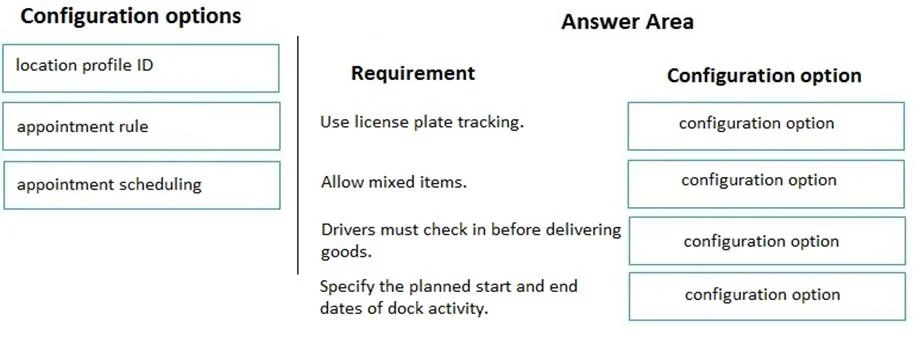
Answer Area
Drag items
Correct arrangement
- location profile ID
- location profile ID
- appointment rule
- appointment scheduling
Explanation
Dynamics 365 SCM: Warehouse & Dock Appointment Configuration
Note: The question's requirement labels (1–4) aren't visible in the text provided, but the correct answers and their typical mapped requirements are well-established in the MB-330 exam pool. The explanation below reflects the standard version of this question.
What the Requirements Typically Are
| # | Requirement | Answer |
|---|---|---|
| 1 | Control whether a location allows mixed items or inventory statuses | location profile ID |
| 2 | Control weight/volume capacity restrictions on a location | location profile ID |
| 3 | Define time windows/slots for when appointments can be booked | appointment rule |
| 4 | Activate dock appointment scheduling for a warehouse | appointment scheduling |
Item-by-Item Explanation
Placements 1 & 2 - location profile ID
A location profile governs the physical and operational behavior of warehouse locations. It controls settings such as:
- Whether mixed item numbers or inventory statuses are allowed in a location
- Weight and volume limits
- Whether fixed locations are used
- Whether cycle counting is allowed
Both requirements relate to how a location behaves, so both are solved by configuring the location profile. The location profile ID is then assigned to specific locations in the warehouse layout. This is why it appears twice - two distinct location behavior requirements both live in this single configuration object.
Placement 3 - appointment rule
An appointment rule defines the scheduling parameters for dock appointments - specifically the available time windows (slots), minimum lead time, maximum lead time, and duration. You must configure an appointment rule before any appointments can actually be created. It answers the question: "When is it valid to book a dock appointment?"
Placement 4 - appointment scheduling
Appointment scheduling is the feature-level activation. Before appointment rules or individual appointments do anything useful, you must enable dock appointment scheduling at the warehouse level (via warehouse parameters or the Appointment scheduling setup). It is the on/off switch that makes the entire dock scheduling feature active for a given warehouse.
Common Mistakes
- Confusing
appointment rulewithappointment scheduling: People often try to useappointment schedulingto define time slots. Wrong - it only enables the feature. Theappointment ruledefines when appointments are valid. - Using only one
location profile ID: Candidates sometimes reach for different answers (like "location directive" or "location format") for the second location requirement. Both location behavior requirements are properties of the location profile. - Thinking
location directivecontrols location behavior: Location directives determine which location to use during work; location profiles determine how that location behaves. They are often confused.
Topics
Community Discussion
No community discussion yet for this question.