
MB-330 · Question #386
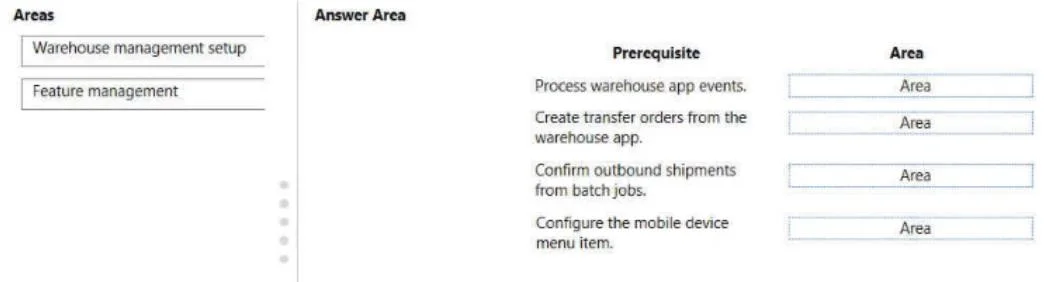
Drag and Drop Question A distribution company uses Dynamics 365 Supply Chain Management. Users in the warehouse must have the ability to create and process transfer orders from a mobile device. You…
The correct answer is Feature management; Feature management; Feature management; Warehouse management setup. Dynamics 365 SCM: Mobile Transfer Order Setup - Explained Context In D365 Supply Chain Management, enabling transfer orders on the Warehouse Management Mobile App requires activating multiple features before any warehouse configuration can be done. This is a common pattern in…
Question
Exhibit
Answer Area
Drag items
Correct arrangement
- Feature management
- Feature management
- Feature management
- Warehouse management setup
Explanation
Dynamics 365 SCM: Mobile Transfer Order Setup - Explained
Context
In D365 Supply Chain Management, enabling transfer orders on the Warehouse Management Mobile App requires activating multiple features before any warehouse configuration can be done. This is a common pattern in D365 SCM - Feature Management acts as the gate.
Why This Arrangement?
Placements 1, 2, 3 → Feature Management
These three placements correspond to distinct features that must be enabled in Inventory and warehouse management > Feature Management before mobile transfer order processing is possible:
| # | Feature to Enable |
|---|---|
| 1 | Create transfer orders from the warehouse app |
| 2 | Transfer order lines processing capability |
| 3 | Process transfer order lines to warehouse (or outbound shipment order feature) |
Technical reason: These are opt-in features in D365 SCM. Until explicitly enabled in Feature Management, the related menu items, work types, and configurations do not appear in Warehouse management setup at all. You cannot configure what doesn't exist yet.
Placement 4 → Warehouse Management Setup
Once features are enabled, you configure Warehouse management setup, specifically:
- Mobile device menu items (create/receive transfer orders)
- Work templates for transfer order picking
- Location directives for putaway/picking logic
Technical reason: This is where the actual operational configuration lives - but it's only accessible after the features are turned on.
Common Mistakes / Misconceptions
- Doing Warehouse management setup first - Fails because the menu item types for transfer orders don't appear until features are enabled.
- Enabling only one feature - All three features are dependencies; missing any one will result in incomplete mobile functionality.
- Confusing Feature Management with System Administration > Configuration - Feature Management is a dedicated workspace, not a general system parameter screen.
Summary Rule
In D365 SCM mobile scenarios: Feature Management unlocks the capability; Warehouse management setup operationalizes it. Multiple features often need enabling before a single setup area becomes functional.
Topics
Community Discussion
No community discussion yet for this question.