
MB-330 · Question #56
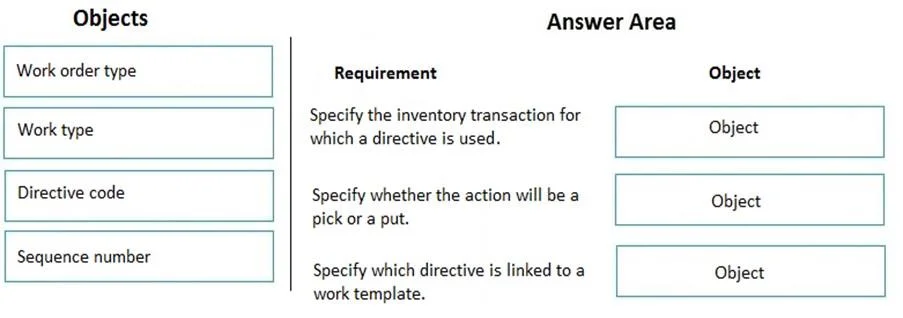
Drag and Drop Question You need to implement location directives in Dynamics 365 Supply Chain Management. Which objects should you use? To answer, drag the appropriate objects to the correct…
The correct answer is Work order type; Work type; Directive code. Location Directives in D365 Supply Chain Management What Are Location Directives? Location directives are warehouse rules that tell the system where to pick from and where to put inventory. They're configured under Warehouse Management > Setup > Location directives and are…
Question
Exhibit
Answer Area
Drag items
Correct arrangement
- Work order type
- Work type
- Directive code
Explanation
Location Directives in D365 Supply Chain Management
What Are Location Directives?
Location directives are warehouse rules that tell the system where to pick from and where to put inventory. They're configured under Warehouse Management > Setup > Location directives and are evaluated in sequence until a matching rule is found.
Why This Specific Arrangement
1. Work Order Type (Position 1)
Role: Top-level filter - the broadest categorization.
Location directives are always tied to a work order type (e.g., Purchase orders, Sales orders, Transfer issue, Counting, etc.). This is the first thing the system checks to determine which directives even apply to a given warehouse task. Without specifying a work order type, the directive has no context - it doesn't know what business process triggered the work.
2. Work Type (Position 2)
Role: Narrows down to Pick or Put.
Within a work order type, the system next evaluates Work Type - whether the operation is a Pick (taking inventory from a location) or Put (placing inventory into a location). Every warehouse work line is either one or the other, so this is a mandatory second filter.
3. Directive Code (Position 3)
Role: Optional precision linker between work templates and location directives.
A directive code creates a direct link between a specific work template line and a location directive. When set on both a work template line and a location directive, the system skips all other directives and uses only the one with the matching code. This is the expert-level control mechanism for precise location assignment.
Why Sequence Number Is Excluded
Sequence number does exist on location directives, but it is not an object you use to implement the directive - it's an ordering attribute that determines evaluation priority among directives. It's automatically managed and doesn't define what the directive does or when it applies.
Common Mistakes
| Mistake | Why It's Wrong |
|---|---|
| Thinking sequence number is a required configuration object | It's an ordering field, not a functional implementation object |
| Skipping directive code | Without it, you lose the ability to tie specific work template lines to specific directives - critical for complex warehouse flows |
| Confusing work type with work order type | Work order type = business process (sales, purchase); work type = operation (pick vs. put) |
Key mental model: Work order type → Work type → Directive code = progressively narrowing filters from business process → operation → specific rule linkage.
Topics
Community Discussion
No community discussion yet for this question.