
MB-330 · Question #55
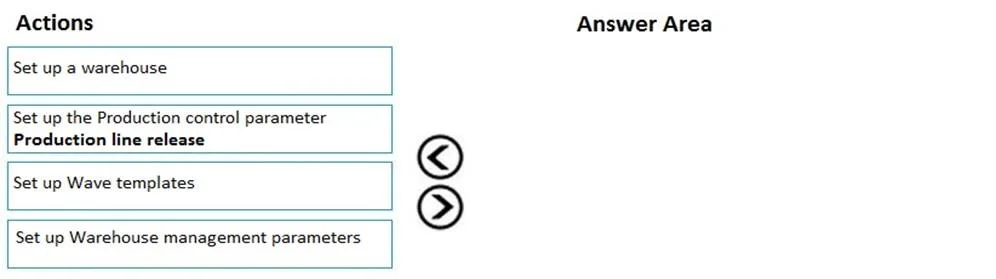
Drag and Drop Question A company uses the Dynamics 365 for Finance and Operations Warehouse management module. The company requires production waves to be processed in batch. You need to configure…
The correct answer is Set up a warehouse; Set up Wave templates; Set up Warehouse management parameters; Set up the Production control parameter; Production line release. Dynamics 365 F&O: Configuring Production Wave Processing - Order Explained The Core Logic The arrangement follows a strict infrastructure → configuration → integration → execution dependency chain. Each step creates the foundation the next step requires. --- Step-by-Step…
Question
Exhibit
Answer Area
Drag items
Correct arrangement
- Set up a warehouse
- Set up Wave templates
- Set up Warehouse management parameters
- Set up the Production control parameter
- Production line release
Explanation
Dynamics 365 F&O: Configuring Production Wave Processing - Order Explained
The Core Logic
The arrangement follows a strict infrastructure → configuration → integration → execution dependency chain. Each step creates the foundation the next step requires.
Step-by-Step Breakdown
1. Set up a warehouse
Why first: The warehouse is the root object. Wave templates, WMS parameters, and production integration all attach to or depend on an existing warehouse with Warehouse management processes enabled. Nothing else can be configured without this foundation in place.
Common mistake: Assuming a basic inventory warehouse is sufficient - it must be explicitly enabled for WMS (the "Use warehouse management processes" flag).
2. Set up Wave templates
Why second: Wave templates define how a wave is created, what it includes (wave type = Production), and what methods run (e.g., work creation, scheduling). They are configured at the warehouse level, so the warehouse must exist first. WMS parameters and Production control will later reference these templates, so they must exist before those steps.
Common mistake: Configuring WMS parameters before templates exist - you'd have nothing to reference.
3. Set up Warehouse management parameters
Why third: WMS parameters contain system-wide settings including "Process waves in batch" - which is the core requirement in this scenario. At this point, wave templates already exist, so the parameters can reference them correctly (e.g., setting a default wave template). This configures the WMS engine before plugging in production.
Common mistake: Doing this before wave templates - the batch processing config would have no templates to work with.
4. Set up the Production control parameter
Why fourth: This step connects the Production module to WMS, enabling settings like "Release to warehouse" behavior for production orders. It depends on WMS being fully configured (steps 1–3) because it references that infrastructure to route production demand into waves.
Common mistake: Doing this before WMS parameters - the production module would be pointed at an incomplete WMS setup.
5. Production line release
Why last: This is an operational/transactional action, not a configuration step. Once all configuration is complete, releasing a production line sends demand to the warehouse, which the wave engine (now running in batch) picks up and processes. This cannot happen until everything above is in place.
Common mistake: Treating this as a configuration step - it is the trigger that tests the configuration, not part of building it.
Summary Table
| Step | Action | Dependency |
|---|---|---|
| 1 | Set up warehouse | None - root object |
| 2 | Set up Wave templates | Requires warehouse |
| 3 | Set up WMS parameters | Requires templates to reference |
| 4 | Set up Production control parameter | Requires WMS fully configured |
| 5 | Production line release | Requires all config complete |
The pattern to remember: you can't configure what doesn't exist, and you can't execute before you configure.
Topics
Community Discussion
No community discussion yet for this question.