
MB-330 · Question #51
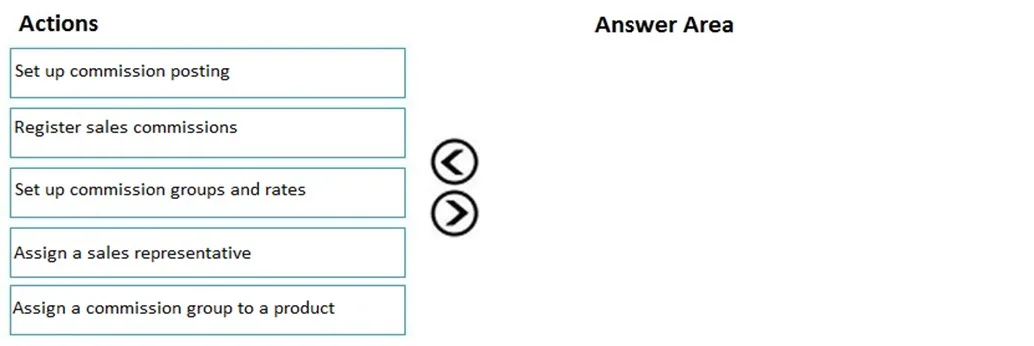
Drag and Drop Question A company uses Dynamics 365 Supply Chain Management. You just implement commission groups to match commission rates to products. You need to configure commission tracking…
The correct answer is Set up commission groups and rates; Set up commission posting; Assign a commission group to a product. Dynamics 365 SCM: Configuring Commission Tracking Context The question establishes that commission groups already exist (they were "just implemented"). The task is to wire up commission tracking - meaning the financial recording and product linkage. The three correct steps are…
Question
Exhibit
Answer Area
Drag items
Correct arrangement
- Set up commission groups and rates
- Set up commission posting
- Assign a commission group to a product
Explanation
Dynamics 365 SCM: Configuring Commission Tracking
Context
The question establishes that commission groups already exist (they were "just implemented"). The task is to wire up commission tracking - meaning the financial recording and product linkage. The three correct steps are all configuration steps, not transactional steps.
Step-by-Step Reasoning
1. Set up commission groups and rates (foundational prerequisite)
This must come first because everything else depends on it. Commission groups define which sales reps earn commissions and at what percentage. Without defined groups and rates, there is nothing to post to the GL and nothing to assign to products. Even though the question implies some groups exist, this step formalizes the rates structure before any system linkage can occur.
In D365 SCM: Sales and marketing > Commissions > Commission groups / Commission rates
2. Set up commission posting (financial backbone)
Before commissions can be tracked, the system needs to know where to record them in the general ledger - specifically the expense and liability accounts. This step must happen before products are assigned, because the posting profile is what makes commission tracking financial and auditable. Skipping this means commissions get calculated but cannot be posted or reported on.
In D365 SCM: Sales and marketing > Commissions > Commission posting
3. Assign a commission group to a product (product linkage)
Only after the groups, rates, and posting rules are defined can you associate specific products (or item groups) with a commission group. This is the step that triggers commission calculation when those products appear on a sales order.
In D365 SCM: Item groups or product setup > Commission group field
Why the Other Two Items Are Excluded
| Item | Why excluded |
|---|---|
| Assign a sales representative | Reps are assigned to customers or territories, not to the commission tracking configuration chain for products. It's a master data step, not a commission tracking setup step. |
| Register sales commissions | This is a transactional operation (run after invoicing to post earned commissions). It belongs to day-to-day operations, not the initial configuration sequence. |
Common Mistakes
- Confusing "Assign a sales representative" as required here - reps must exist, but assigning them is separate from configuring how products earn commissions.
- Putting posting setup last - candidates assume you configure posting after everything else, but it must precede product assignment because product assignment is meaningless without a GL target.
- Including "Register sales commissions" - this sounds like "tracking" but it's a period-end posting run, not a setup action.
Topics
Community Discussion
No community discussion yet for this question.