
MB-330 · Question #45
Drag and Drop Question You are the inventory manager for a distribution center. You are configuring the inventory breakdown for a new center in California. You need to set up warehouse locations for…
The correct answer is Create a site; Create a warehouse; Create an aisle; Create a rack; Create a shelf; Create a location. Inventory Location Hierarchy - Explanation This question tests your knowledge of Microsoft Dynamics 365 Supply Chain Management (D365 SCM) warehouse setup. The system enforces a strict parent-child hierarchy - you cannot create a child record without its parent existing first…
Question
Exhibit
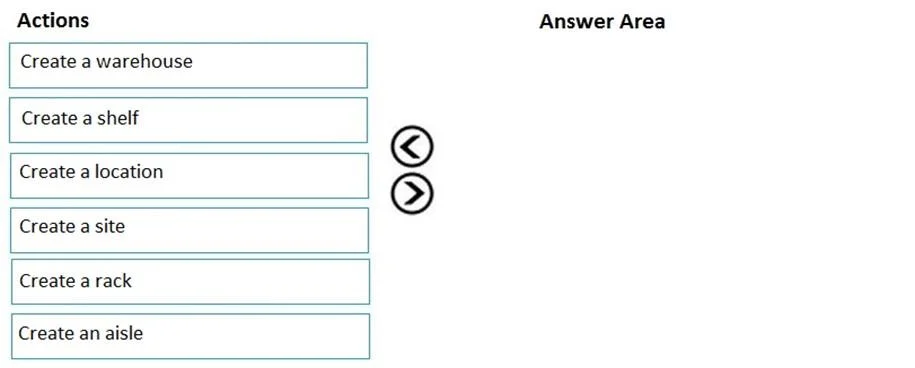
Answer Area
Drag items
Correct arrangement
- Create a site
- Create a warehouse
- Create an aisle
- Create a rack
- Create a shelf
- Create a location
Explanation
Inventory Location Hierarchy - Explanation
This question tests your knowledge of Microsoft Dynamics 365 Supply Chain Management (D365 SCM) warehouse setup. The system enforces a strict parent-child hierarchy - you cannot create a child record without its parent existing first.
Note: The question says "four actions" but the correct answer uses all six items. This is likely a transcription error in the question. All six steps are required.
The Hierarchy (Top → Bottom)
Site
 └── Warehouse
      └── Aisle
           └── Rack
                └── Shelf
                     └── Location
Each Placement Explained
1. Create a site
Why first: A site is the highest-level organizational unit - it represents a geographic business location (e.g., "California Distribution Center"). In D365, a warehouse must be tied to a site. Nothing below can exist without it.
2. Create a warehouse
Why second: A warehouse is a physical building within a site. It is the second tier and must reference the site you just created. All physical storage structures live inside a warehouse.
3. Create an aisle
Why third: An aisle is a navigable path within the warehouse. It is the first physical sub-division of warehouse floor space. Racks are placed along aisles, so the aisle must exist before a rack can be assigned to it.
4. Create a rack
Why fourth: A rack is a freestanding storage structure located within an aisle. Shelves are mounted on racks, so the rack must exist first.
5. Create a shelf
Why fifth: A shelf is a horizontal level on a rack. Locations (bins/slots) are placed on shelves, so the shelf must precede the location.
6. Create a location
Why last: A location (also called a bin or slot) is the most granular unit - it is the exact coordinate where inventory physically sits. It references a shelf and cannot be created until all parent records exist.
Common Mistakes & Misconceptions
| Mistake | Why It's Wrong |
|---|---|
| Creating a warehouse before a site | D365 requires a site FK on every warehouse record - it will error |
| Skipping aisle and going rack → shelf → location | Racks must belong to an aisle; the aisle is not optional |
| Confusing "location" with "warehouse" | "Location" is the bin-level slot, not the building - it's the most granular unit |
| Creating a rack before an aisle | Racks are children of aisles; no aisle = no valid parent reference |
| Thinking shelf is optional | In the full D365 location hierarchy, shelf is a required intermediate level between rack and location |
Key mental model: Each level is a container for the next. You always build the container before filling it. The sequence flows from largest geographic scope (site) down to the smallest physical slot (location).
Topics
Community Discussion
No community discussion yet for this question.